EasyManua.ls Logo

Bush LED24265DVDCNTD - DVD Mode Remote Control Functions

Bush LED24265DVDCNTD
72 pages
Print Icon
To Next Page IconTo Next Page
To Previous Page IconTo Previous Page
Loading...
For any help concerning set up and use of your TV please call the Customer Helpline: 0 345 604 0105
Getting Started
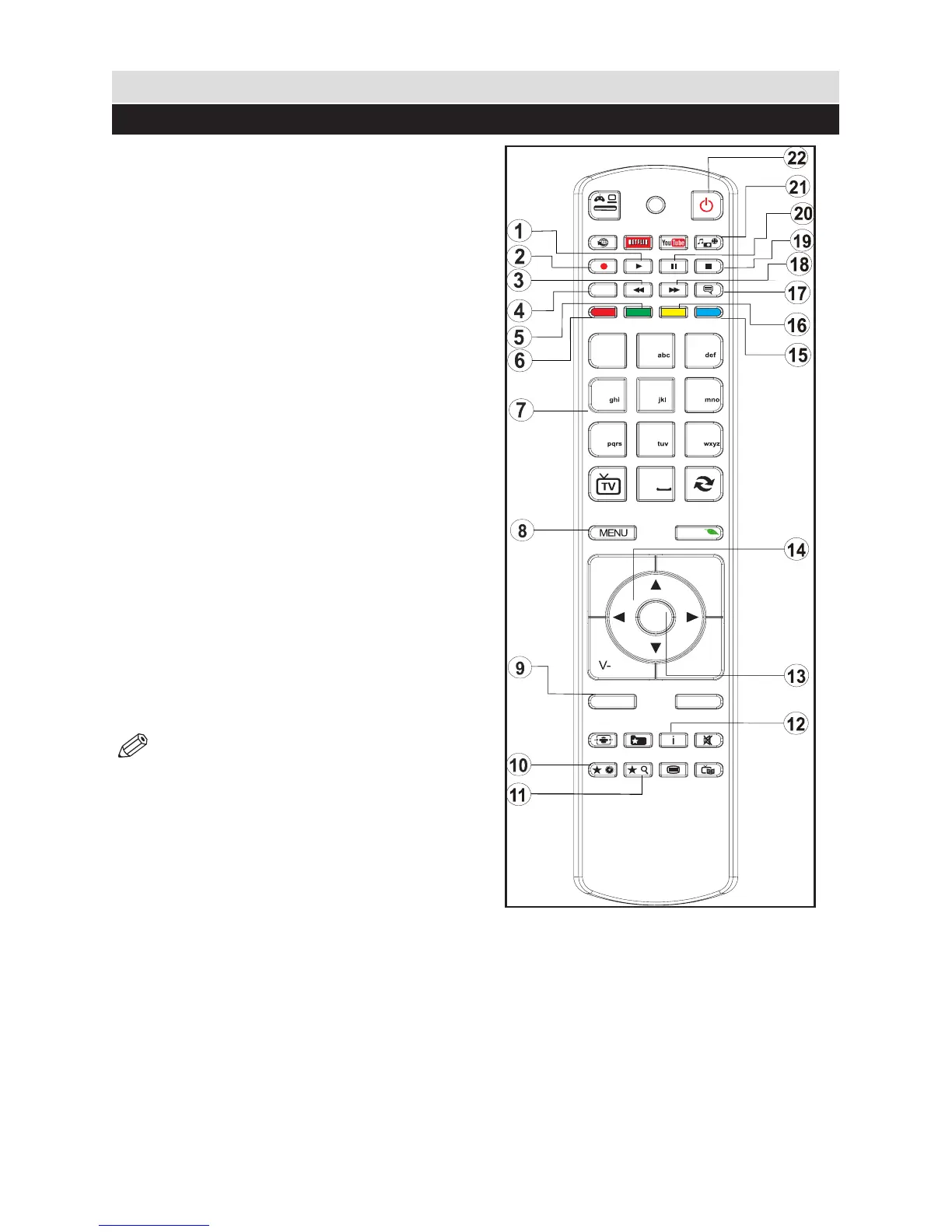
Viewing remote control - DVD
1. Play
2. No function
3. Rapid reverse
4. Language selection
5. Repeat
6. Zoom
7. Numeric buttons
8. TV Menu
9. Back
10. Display / DVD Menu
11. Search mode
12. Info
13. OK / Select
14. Navigation buttons
15. Title
16. Root
17. Subtitle
18. Rapid advance
19. Stop
20. Pause
21. Angle
22. Standby
NOTE: Remote Control buttons that are
not indicated with a number cannot be used
in DVD mode.
4
7
8
9
0
1
.,/@
2
3
5
6
OK
Q.MENU
EXIT
BACK
LANG.
2
1
SOURCE
/
/
P+
P-
V+
11

Table of Contents

Related product manuals