General TV Operation
Picture Controls
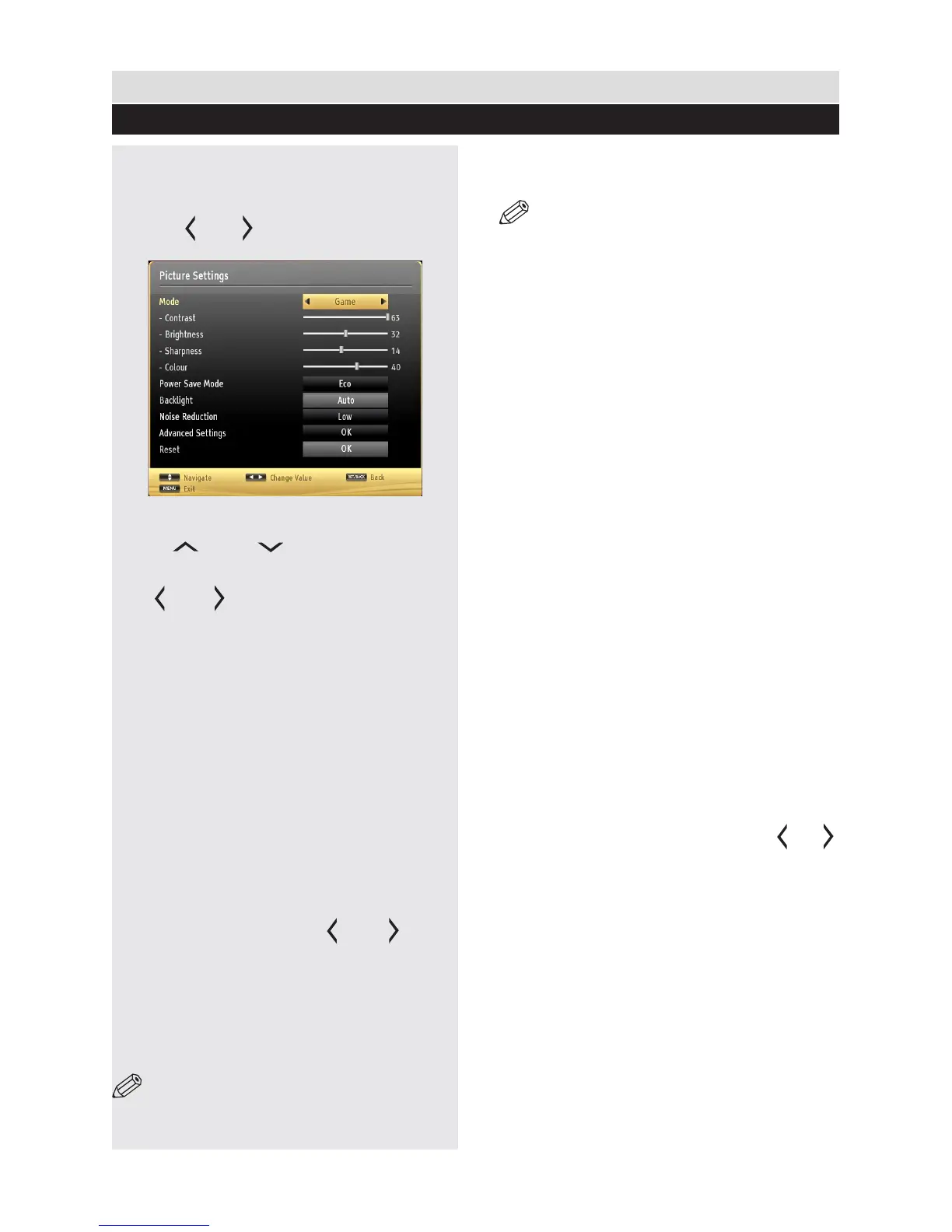
Conguring Picture Settings
You can use different picture settings in detail.
Press “MENU” button and select the Picture icon
by using “ ” or “ ” button. Press OK button to
view Picture Settings menu.
Operating Picture Settings Menu Items
Press “ ” or “ ” button to highlight a
menu item.
Use “ ” or “ ” button to set an item.
Press “MENU” button to exit.
Picture Settings Menu Items
Mode: For your viewing requirements, you can set
the related mode option. Picture mode can be set
to one of these options: Cinema,Game,Dynamic,
Sport and Natural.
Contrast: Sets the lightness and darkness
values of the screen.
Brightness: Sets the brightness value for the
screen.
Sharpness: Sets the sharpness value for the
objects displayed on the screen.
Colour: Sets the colour value for the screen.
Power Save Mode : Press “ ” or “ ” button
to set Power Save Mode.
If Picture Off is selected, “Screen will be off in 15
seconds.” message will be displayed on the screen.
Select PROCEED and press OK to continue. The
screen will be off in 15 seconds. If you disable Power
Save Mode, Picture mode will be automatically set
to Dynamic.
NOTE: The backlight function will be inactive
if Power Save Mode is set to Eco.
Backlight : This setting controls the backlight
level and it can be set to Auto, Maximum,
Minimum or Medium.
NOTE: Backlight can not be activate in VGA
or Media Browser mode or while picture mode
is set as Game.
Noise Reduction: If the broadcast signal is weak
and the picture is noisy, use Noise Reduction
setting to reduce the noise amount. Noise
Reduction can be set to one of these options:
Low, Medium, High or Off.
Advanced Settings
• Dynamic Contrast: Sets the dynamic
contrast rate.
• Colour Temp: Sets the desired colour tone.
Setting Cool option gives white colours a slight blue
stress.
For normal colours, select Normal option.
Setting Warm option gives white colours a slight red
stress.
• Picture Zoom: Sets the picture size to
Auto,16:9, Subtitle,14:9, 14:9 Zoom, 4:3,
Panoramic or Cinema.
• HDMI True Black: While watching from
HDMI source, this feature will be visible in the
Picture Settings menu. You can use this feature
to enhance blackness in the picture. You can
set this feature as “On” for activating HDMI True
Black mode.
• Film Mode (optional): Films are recorded
at a different number of frames per second to
normal television programmes. Press “ ” or “ ”
buttons to set this feature Auto or Off. Turn this
feature to Auto when you are watching lms to
see the fast motion scenes clearly.
• Skin Tone: Sets the skin tone level of your TV.
• Colour Shift: Adjust the desired colour tone.
• RGB Gain: You can configure the colour
temperature values using the RGB Gain feature.
Reset: Resets the picture settings to factory
default settings.
While in VGA (PC) mode, some items in Picture
menu will be unavailable. Instead, VGA mode
settings will be added to the Picture Settings
while in PC mode.
28



 To Next Page