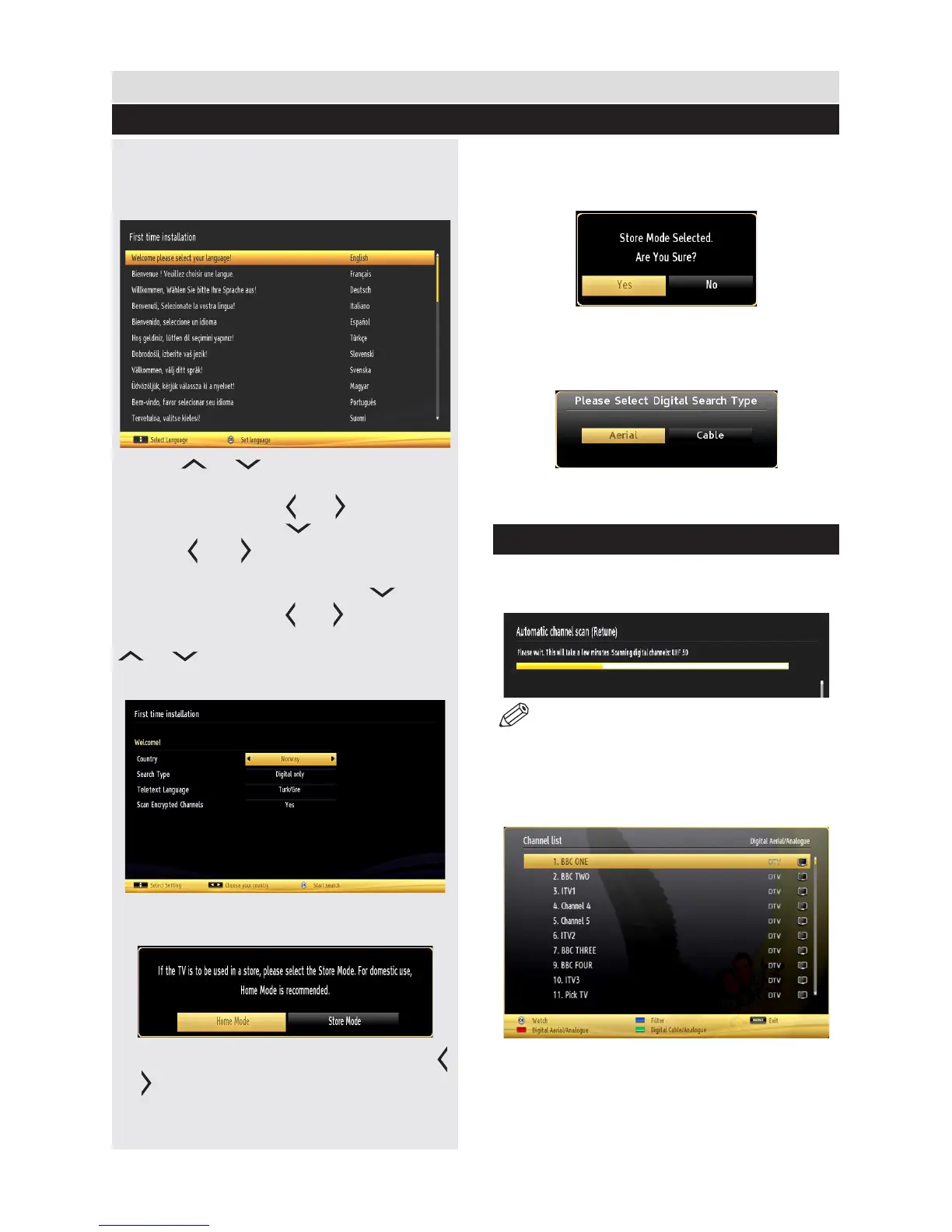
When turned on for the rst time, the “language
selection” menu appears. The message “Welcome
please select your language!” is displayed in all
language options listed alphabetically.
Press the “ ” or “ ” button to highlight the required
language, press OK button to select. “First Time
Installation” appears. Use “ ” or “ ” button to set the
required country, and press “ ” button to select Search
Type. Use ” or “ ” to set the desired search type.
Available search types are Digital and analog, digital
only and analog only. When set, press “ ” to select
Teletext Language. Use “ ” or “ ” button to set the
“Teletext Language” and select “Scan Encrypted” using
“ ” or “ ” button. You can set Scan Encrypted as
Yes if you want to scan coded stations.
Press OK button on the remote control to continue and
the following message will be displayed on the screen.
You can activate Store mode option by using “ ”
or “ ” button. If Store Mode (optional) is selected,
Store mode option will be available in other settings
menu and your TV’s settings will be optimized for
best display quality. A conrmation screen will be
displayed after selecting the Store Mode. Select
YES to proceed.
If Home Mode is selected, Store mode will not be
available after the First Time Installation. Press OK
button on the remote control to continue and the following
message will be displayed on the screen.
You must select a search type to search and store
broadcasts from the desired source.
Aerial Installation
If you select AERIAL option from the Search Type screen,
the television will search for digital terrestrial TV broadcasts.
NOTE: You can press “MENU” button to cancel.
After all the available stations are stored, Channel
List will be displayed on the screen. If you like the sort
channels, according to the LCN (if available*), please
select “Yes” and than press OK.
Press OK button to quit channel list and watch TV.
(*) LCN is the Logical Channel Number system that
organizes available broadcasts in accordance with a
recognizable channel sequence.
15
Getting Started
First Time Installation



 To Next Page