Connectivity Functions
Nero MediaHome Installation
56
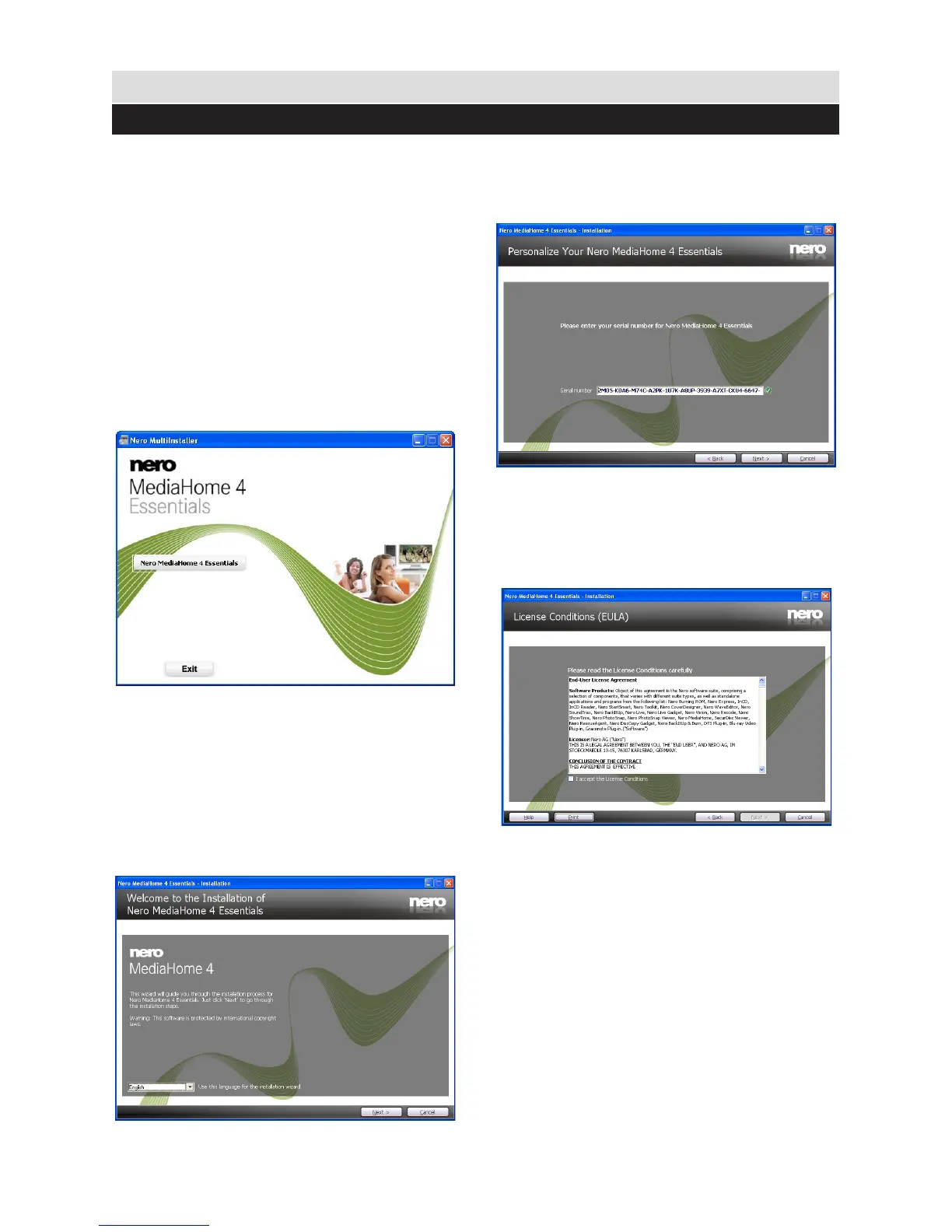
To install Nero MediaHome, please proceed
as follows:
Note: To use DLNA function, this software
should be installed to your PC.
1. Insert the Nero MediaHome installation
disc in your optical disc drive.
• The Nero MultiInstaller screen with a
button to start the installation process will open
automatically.
• If below window is not displayed automatically,
double-click on the le SetupX located on
the Nero MediaHome installation disc.
2. Click on the button labeled Nero
MediaHome Essentials to start the installation
process.
• The Nero MediaHome installation wizard is
displayed.
• If necessary change installation
language from the language selection menu
before continuing.
3. Click the Next button.
• The integrated serial is displayed.
• Please do not change displayed serial.
4. Click the Next button.
• The License Conditions (EULA) screen is
displayed.
5. Please read the license agreement
carefully and select the appropriate check box
if you agree to the terms of the agreement.
Installation is not possible without this
agreement.



 To Next Page