154 4-5 Driving Auxiliary Functions
Type of sensor
■ The corresponding image will be displayed on the multimedia display screen
(if any) based on the orientation of obstacle and the distance between
vehicle and obstacle when an obstacle is detected by sensors.
■ For parallel parking or reverse parking, sensors can measure the distance
between vehicle and obstacle and transmit the measured distance to the
multimedia display screen and the speaker. Be sure to watch the
surroundings of the vehicle when using this system.
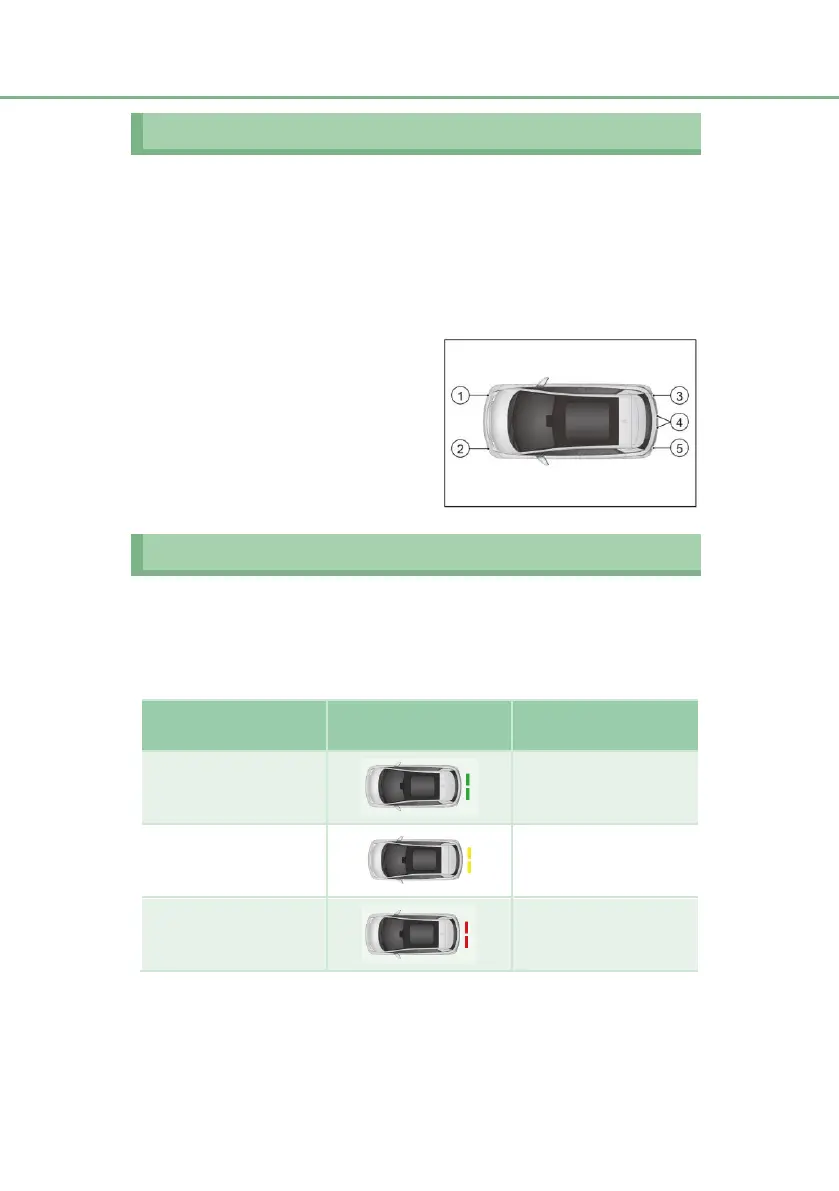
① Front right corner sensor (if any)
② Front left corner sensor (if any)
③ Rear right corner sensor
④ Rear left and right middle sensors
⑤ Rear left corner sensor
Distance display and alarm
When an obstacle is detected by sensors, the orientation of the obstacle and the
approximate distance between vehicle and obstacle will be displayed on the
multimedia display screen and the speaker will sound.
Operation examples of central sensor
Approximate distance
(mm)
Examples of multimedia
display












 To Next Page