A2+/A4+/A6+/A8+
External keyboard
Edition 5/06 Configuration Instructions 65
Characters between vertical lines (| / |, | * |) are entered with the corresponding keys on the numerical
keypad of the keyboard.
Other special characters:
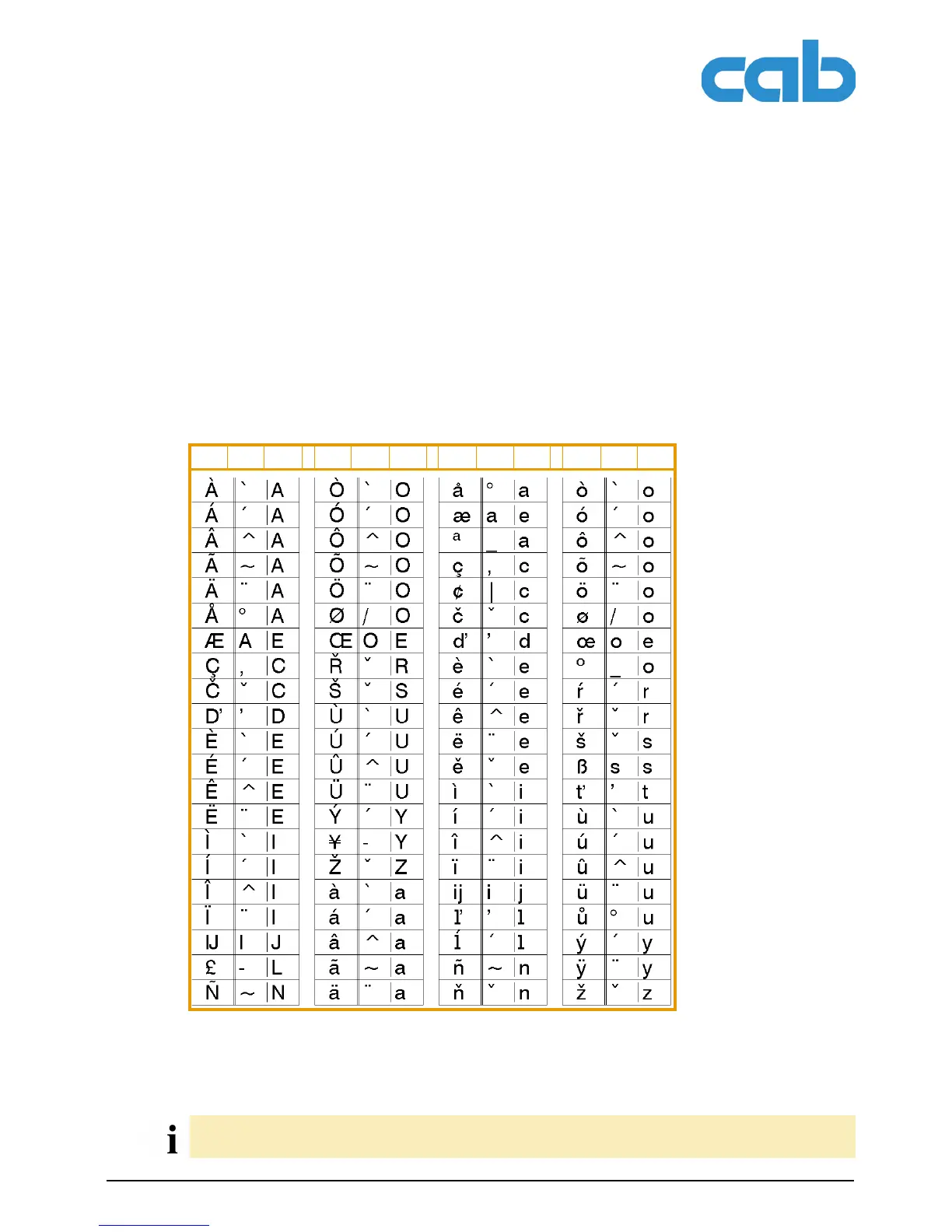
A special character in the ZZ column can be entered by first entering the corresponding character in the
Z1 column and then entering the character in the Z2 column while pressing the [Alt] button.
Tab. 28:Special characters entered via a sequence of two characters
Example:
GR: Deutschland SG: Schweiz IT: Italia
FR: France SF: Suisse SP: España
UK: United Kingdom BE: Belgie DK: Danmark
US: USA SU: Suomi CZ: Ceska republika
ZZ Z1 Z2 ZZ Z1 Z2 ZZ Z1 Z2 ZZ Z1 Z2
Entering the character: ñ 1st entry: [~] 2. entry: [Alt] + [n]
If necessary, use the information in Table 27 on Page 64 to enter the character Z1.



 To Next Page