Page 24 - Manual FA01768-EN - 07/2022 - © CAME S.p.A. - The contents of this manual may be changed at any time and without notice. - Translation of the original instructions
Manoeuvre counter
View the number of operator manoeuvres.
001 = 100 manoeuvres / 010 = 1000 manoeuvres /100 = 10000 manoeuvres / 999 = 99900 manoeuvres / CSI = maintenance job
A5 Tot = total manoeuvres - Manoeuvres performed since the operator was installed.
Par = partial manoeuvres - Manoeuvres carried out after the last maintenance.
Under the [Par] parameter, press the ENTER key to reset the number of partial manoeuvres. [Clr] will appear
on the screen to confirm deletion.
Adjusting the motor torque
Adjust the motor torque.
A6 1 to 5 (Default 5)
- 1 minimum torque
- 5 maximum torque
FW version
Display the firmware version.
H1 Use the < > arrows to show the versions of the display board and the control board one after the other.
Import/export data
Save user data and system configuration data on a MEMORY ROLL card.
The stored data can be reused for another control board of the same type to carry across the same configuration.
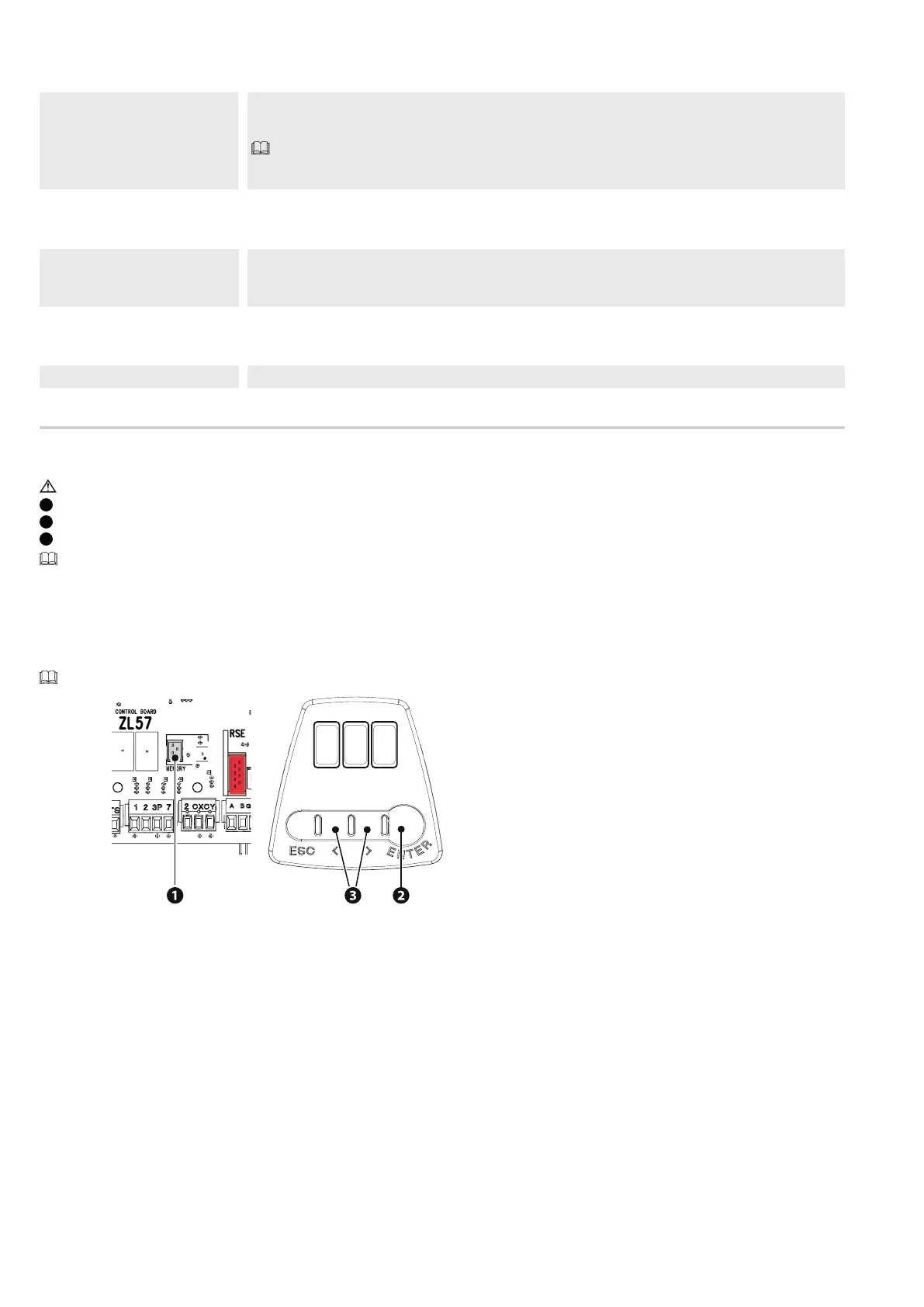
Before inserting and removing the MEMORY ROLL card, DISCONNECT THE MAINS POWER SUPPLY TO THE LINE.
1
Insert the MEMORY ROLL card into the corresponding connector on the control board.
2
Press the “Enter” button to access programming.
3
Use the arrows to choose the desired function.
The functions are displayed only when a MEMORY ROLL card is inserted.
F50 -Save data
Save user data, timings and configurations to the memory device (memory roll).
F51 -Read data
Upload user data, timings and configurations to the memory device (memory roll).
Once the data have been saved and loaded, the MEMORY ROLL can be removed.


 To Next Page