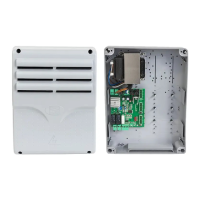
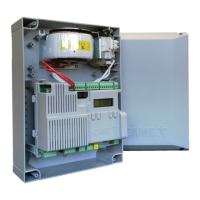
The CAME ZL60 is a control panel designed for 24 V gearmotors, specifically for one or two-leaf swing gates. It features DIP switch settings for configuration, on-board radio decoding, and safety device self-diagnostics. This control panel is intended for use in private homes and apartment buildings. Any installation or use other than that specified in the manual is forbidden.
Technical Specifications:
- Type: ZL60
- Protection Rating (IP): 54 series
- Power Supply (V - 50/60 Hz): 230 AC
- Motor Power Supply (V): 24 DC
- Stand-by Consumption (W): 7 series
- Stand-by Consumption with RGP1 Module (W): 1.15 series
- Maximum Power (W): 300 series
- Casing Material: ABS
- Operating Temperature (°C): -20 to +55
- Storage Temperature (°C): -25 to +70
- Average Life (cycles): 100,000
- Apparatus Class: I
- Weight (kg): 3.6 series
Function Description:
The ZL60 control panel manages the operation of swing gates, offering a range of programmable functions to ensure safe and efficient automation. It supports both single and dual motor configurations and includes features for self-learning of gate travel, obstruction detection, and various command inputs.
Usage Features:
- Motor Type Configuration: By default, the control panel is configured for OPP001 and FTL20DGC-series gearmotors. It can be reconfigured for OPS001 and BXL04AGS-series gearmotors via DIP switch settings and the PROG button.
- Number of Motors: The panel is set by default for two motors but can be configured for a single motor.
- TOTAL STOP from Button (contact 1-2): This feature is enabled by default, allowing the gate to stop completely. It can be disabled if not required.
- Self-learning of Gate Travel: The system can learn the gate's travel limits and slow-down starting points. This process involves a series of maneuvers where the operator presses the PROG button when the gate leaves reach the desired positions. The PRG LED flashes during calibration, and a buzzer sounds once calibration is complete. Unsuccessful calibration is indicated by rapid LED flashes and seven buzzer sounds. The self-learning operation can be interrupted by pressing the STOP button.
- Reopening During Closing (contact 2-C1): This safety feature, disabled by default, allows the gate to reopen if the photocell contact (C1) is triggered during closing.
- Input on Contact 2-CX: This feature, disabled by default, allows configuration of contact CX for partial stop or obstruction wait functions.
- Partial Stop or Obstruction Wait (contact 2-CX): By default, this function is set to partial stop. It can be configured for obstruction wait, where the gate stops upon obstruction and resumes movement once the obstruction is removed.
- OPEN-CLOSE-INVERT or OPEN-STOP-CLOSE-STOP from Button (contact 2-7): The default command mode is OPEN-CLOSE-INVERT. It can be configured to OPEN-STOP-CLOSE-STOP.
- Partial Opening or Pedestrian Opening (contact 2-3P): By default, the opening is set to pedestrian mode. This can be enabled or disabled.
- Obstruction Detection with Motor Stopped: This function is enabled by default, enhancing safety by detecting obstructions even when the motor is stopped.
- Excluding the Encoder: The encoder is enabled by default but can be excluded if necessary.
- Timed Slow-down (with Encoder disabled): This feature is disabled by default. When enabled, it allows for timed slow-down operation.
- Automatic Closing: This feature is disabled by default. When enabled, the gate automatically closes after a set waiting time. The automatic closing time can be adjusted using the A.C.T. trimmer. The automatic closing does not activate if safety devices are triggered due to obstruction detection or if the power supply is missing.
- Automatic Closing After Either Partial or Pedestrian Opening: This feature is disabled by default. When enabled, the gate automatically closes after a partial or pedestrian opening. The pre-flashing duration is set to 10 seconds.
- Closing Thrust: This feature is disabled by default. When enabled, it adjusts the force applied during closing.
- Saving Trimmer Values: Trimmer values for Automatic Closing Time (A.C.T.), opening and closing latching points, second motor's closing-delay speed (SDS), slow-down speed (SDS), and sensitivity (SENS.) can be saved by selecting the appropriate DIP switches and pressing the PROG button.
- Services Test: This feature, disabled by default, allows the control board to check the efficacy of safety devices like photocells. Any anomalies will inhibit all commands.
- Button-activated Maintained Action: This feature, disabled by default, allows the gate to open and close only when the button is kept pressed. All other control devices, including radio-based ones, are excluded in this mode.
- User Management (up to 25 users): The system supports saving up to 25 users for various opening commands (Partially Open, Open Only, OPEN-CLOSE-INVERT, OPEN-STOP-CLOSE-STOP) via keypad selector or transmitter buttons. The PRG LED flashes during the saving process and turns on once complete. Quick LED flashes and seven buzzer sounds indicate a previously saved user or maximum user capacity exceeded.
- Deleting All Users: All saved users can be deleted by selecting the appropriate DIP switches and pressing the PROG button for five seconds.
- Resetting Parameters: All parameters can be reset to default by selecting the appropriate DIP switches and pressing the PROG button for five seconds. This function does not delete any users.
Maintenance Features:
- Alert LED: The control panel includes an Alert LED (PRG Red) that warns about programming phases, automatic closing waiting time, and any errors or malfunctions.
- Troubleshooting: The manual provides a troubleshooting guide with possible causes and fixes for common alerts indicated by the PROG LED and buzzer sounds, such as control board not working, self-learning errors, encoder errors, services test errors, operating time errors, maximum obstructions detected, and errors during parameter reset or user deletion.
- Fuses: All connections and links are protected by rapid-fuses (HD Analog: 2 A-F = 230 V, Accessories/board: 2 A-F).
- Safety Device Self-diagnostics: The control board checks the efficacy of safety devices at each opening and closing command. Anomalies inhibit all commands.
- Ferrite for Gearmotor Cables: Applying a FAIR-RITE type material 31 ferrite (mod. 2631102002, not supplied) to the gearmotor cables inside the control panel is recommended.
Adjusting Functions (Trimmers):
- A.C.T. (Automatic Closing Time): Adjusts the open gate's waiting time from 1 to 180 seconds before automatic closing.
- APP./O.T. (Latching Point / Operating Time): With the Encoder enabled, it adjusts the motors' final resting point (1% to 10% of travel). With the Encoder disabled, it sets the operating time from 5 to 120 seconds.
- 2M DELAY (M2 Closing Delay Time): Adjusts the delay for gearmotor M2 to start closing compared to M1, from 3 to 25 seconds.
- SPEED (Travel Speed): Adjusts the gearmotors' speed during maneuvers from 30% (-) to 100% (+). If the Encoder and timed slow-downs are disabled, the top speed is 50%.
- SLOW (Slow-down Speed): Adjusts the gearmotors' speed when slowing down from 30% (-) to 60% (+) of the maximum speed. If the slow-down speed is greater than the travel speed, the travel speed is automatically limited.
- SENS. (Sensitivity): Adjusts the obstruction detection sensitivity during gate movement, from minimum (-) to maximum (+).



 To Next Page
 General