182
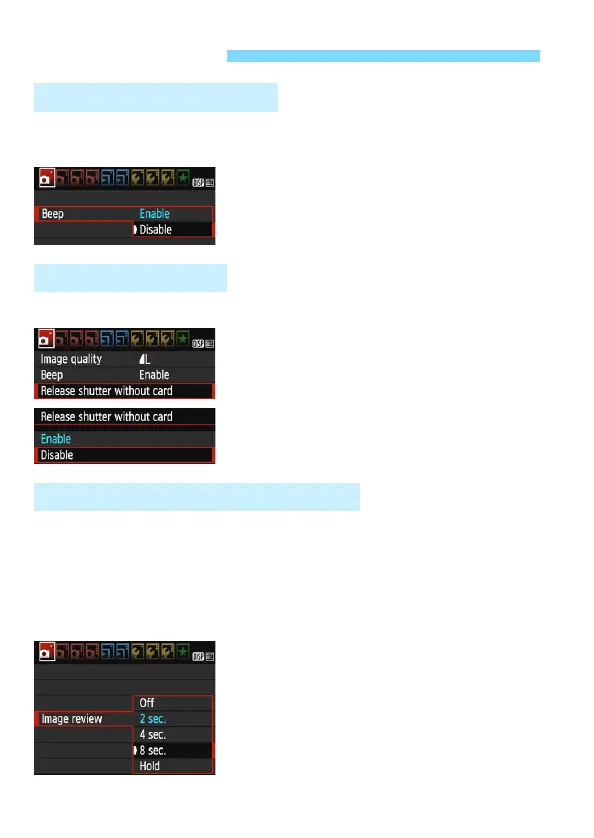
You can prevent the beeper from sounding when focus is achieved or
during self-timer operation.
Under the [z1] tab, select [Beep], then
press <0>. Select [Disable], then press
<0>.
This setting prevents shooting if there is no card in the camera.
Under the [z1] tab, select [Release
shutter without card], then press <0>.
Select [Disable], then press <0>.
If there is no card inserted in the camera
and you press the shutter button, “Card”
will be displayed in the viewfinder, and
you cannot release the shutter.
You can set how long the image is displayed on the LCD monitor
immediately after shooting. If [Off] is set, the image will not be displayed
immediately after shooting. If [Hold] is set, the image review will be
displayed up until the [51: Auto power off] time has elapsed.
During image review, if you operate any camera controls such as
pressing the shutter button halfway, the image review will end.
Under the [z1] tab, select [Image
review], then press <0>. Select the
desired setting, then press <0>.
Handy Features
3 Disabling the Beeper
3 Card Reminder
3 Setting the Image Review Time





 To Next Page