217
k Playing Back Movies
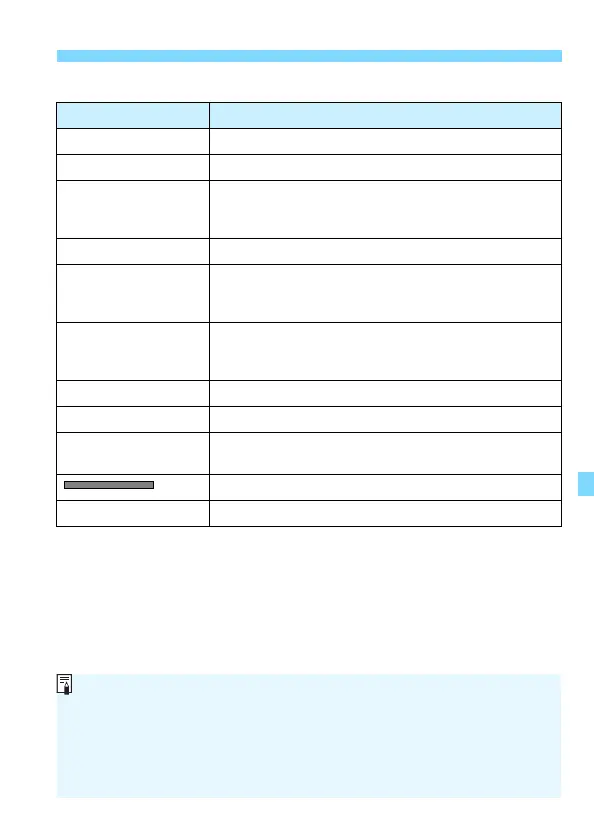
Movie Playback Panel
* When background music is set for playback on a TV set or other device, the
sound recorded in the movie will not be played back.
Operation Playback Description
2 Exit Returns to the single-image display.
7 Play Pressing <0> toggles between playback and stop.
8 Slow motion
Adjust the slow motion speed by pressing the <Y>
<Z> keys. The slow motion speed is indicated on the
upper right of the screen.
5 First frame Displays the movie’s first frame.
3 Previous frame
Each time you press <0>, the previous frame is
displayed. If you hold down <0>, it will rewind the
movie.
6 Next frame
Each time you press <0>, the movie will play frame-
by-frame. If you hold down <0>, it will fast forward the
movie.
4 Last frame Displays the movie’s last frame.
X Edit Displays the editing screen (p.218).
v
Background music
*
Plays back a movie with the selected background music
(p.223).
Playback position
mm' ss" Playback time (minutes:seconds)
With a fully-charged Battery Pack LP-E10, the continuous playback time
at room temperature (23°C / 73°F) will be as follows: Approx. 2 hr. 20 min.
During the single-image display, you can press the <B> button to
change the display format (p.231).
If you connect the camera to a TV set (p.224) to play back a movie,
adjust the sound volume with the TV set.












 To Next Page