EasyManua.ls Logo

Canon EOS A2 - Page 11

Canon EOS A2
72 pages
Print Icon
To Next Page IconTo Next Page
To Previous Page IconTo Previous Page
Loading...
e
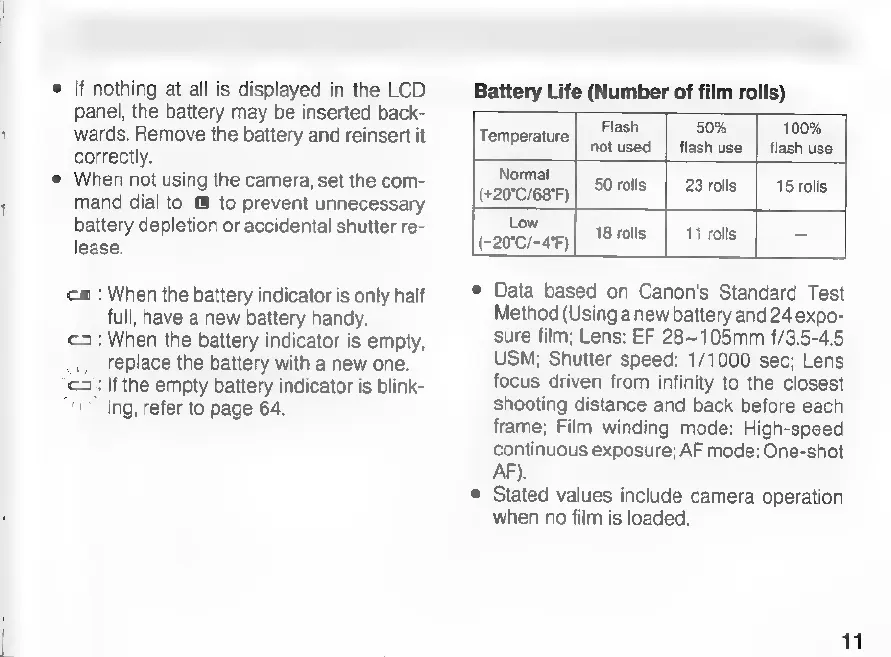
If
nothing
at
all
is
displayed
in
the
LCD
panel,
the
battery
may
be
inserted
back-
wards.
Remove
the
battery
and
reinsert
it
correctly.
When
not
using
the
camera,
set the
com-
mand
dial
to
to
prevent
unnecessary
battery
depletion
or
accidental
shutter
re-
lease.
ca
:
When
the
battery
indicator
is
only
half
full,
have
a
new
battery
handy.
<3:
When
the
battery
indicator
is
empty,
replace
the
battery
with
a
new
one.
cz:
If
the
empty
battery
indicator
is
blink-
ing,
refer
to
page
64.
Battery
Life
(Number
of
film
rolls)
Flash
50%
100%
Temperature
|
notused
|
flash
use
|
flash
use
Normal
(+20°C/68°F)
50
rolls
23
rolls
15
rolls
Low
Cannes}
Trois
|
11
rols
=
e
Data
based
on
Canon's
Standard
Test
Method
(Using
anew
battery
and
24
expo-
sure
film;
Lens:
EF
28~105mm
f/3.5-4.5
USM;
Shutter
speed:
1/1000
sec;
Lens
focus
driven
from
infinity
to
the
closest
shooting
distance
and
back
before
each
frame;
Film
winding
mode:
High-speed
continuous
exposure;
AF
mode:
One-shot
AF).
©
Stated
values
include
camera
operation
when
no
film
is
loaded.
11

Related product manuals