EasyManua.ls Logo

Canon EOS A2 - Film Loading and Settings

Canon EOS A2
72 pages
Print Icon
To Next Page IconTo Next Page
To Previous Page IconTo Previous Page
Loading...
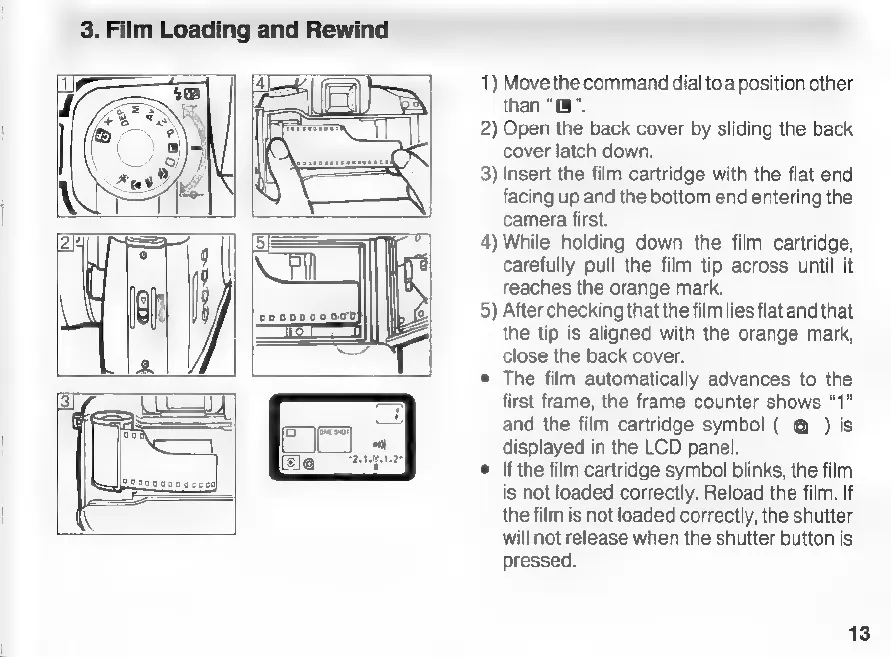
3.
Film
Loading
and
Rewind
1)
Move
the
command
dial
to
a
position
other
than
“0”.
2)
Open
the
back
cover
by
sliding
the
back
cover
latch
down.
3)
Insert
the
film
cartridge
with
the
flat
end
facing
up
and
the
bottom
end
entering
the
camera
first.
4)
While
holding
down
the
film
cartridge,
carefully
pull
the
film
tip
across
until
it
reaches
the
orange
mark.
5)
After
checking
thatthe
film
lies
flatand
that
the
tip
is
aligned
with
the
orange
mark,
close
the
back
cover.
e
The
film
automatically
advances
to
the
first
frame,
the
frame
counter
shows
“1”
and
the
film
cartridge
symbol
(
@
)
is
displayed
in
the
LCD
panel.
If
the
film
cartridge
symbol
blinks,
the
film
is
not
loaded
correctly.
Reload
the
film.
If
the
film
is
not
loaded
correctly,
the
shutter
will
not
release
when
the
shutter
button
is
pressed.
13

Related product manuals