EasyManua.ls Logo

Canon EOS A2 - Flash Exposure Control

Canon EOS A2
72 pages
Print Icon
To Next Page IconTo Next Page
To Previous Page IconTo Previous Page
Loading...
8.
Flash
Exposure
Compensation
This
function
lets
you
vary
the
automatic
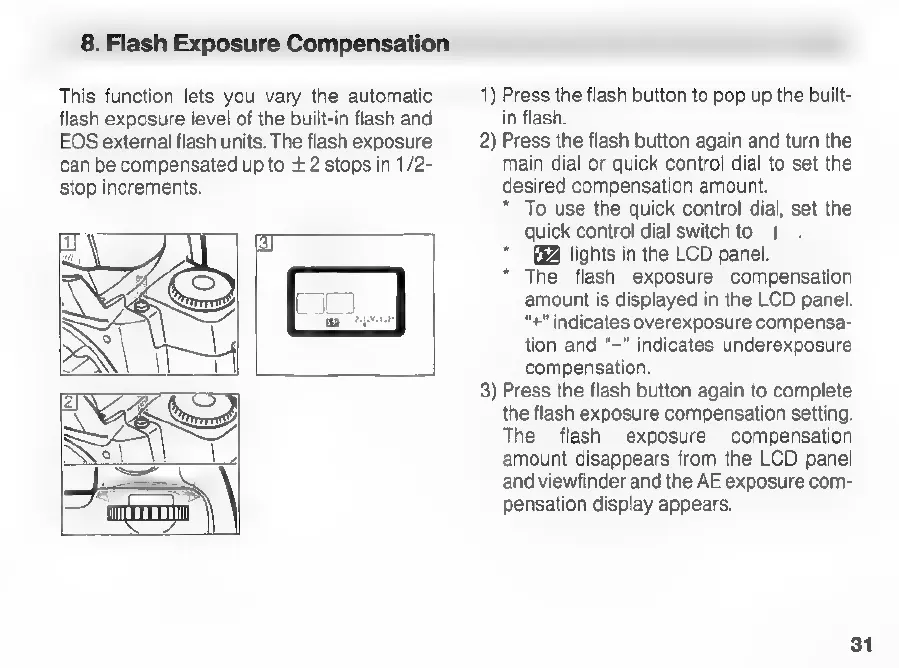
1)
Press
the
flash
button
to
pop
up
the
built-
flash
exposure
level
of
the
built-in
flash
and
in
flash.
EOS
external
flash
units.
The
flash
exposure
2)
Press
the
flash
button
again
and
turn
the
can
be
compensated
up
to
+
2
stops
in
1/2-
main
dial
or
quick
control
dial
to
set
the
stop
increments.
desired
compensation
amount.
*
To
use
the
quick
control
dial,
set
the
3
quick
control
dial
switch
to
|
-
lights
in
the
LCD
panel.
*
The
flash
exposure
compensation
amount
is
displayed
in
the
LCD
panel.
“+"
indicates
overexposure
compensa-
tion
and
“-"
indicates
underexposure
compensation.
oy
3)
Press
the
flash
button
again
to
complete
g>)
the
flash
exposure
compensation
setting.
The
flash
exposure
compensation
amount
disappears
from
the
LCD
panel
and
viewfinder
and
the
AE
exposure
com-
pensation
display
appears.
31

Related product manuals