EasyManua.ls Logo

Canon EOS A2 - 4, Film Speed Setting

Canon EOS A2
72 pages
Print Icon
To Next Page IconTo Next Page
To Previous Page IconTo Previous Page
Loading...
4.
Film
Speed
Setting
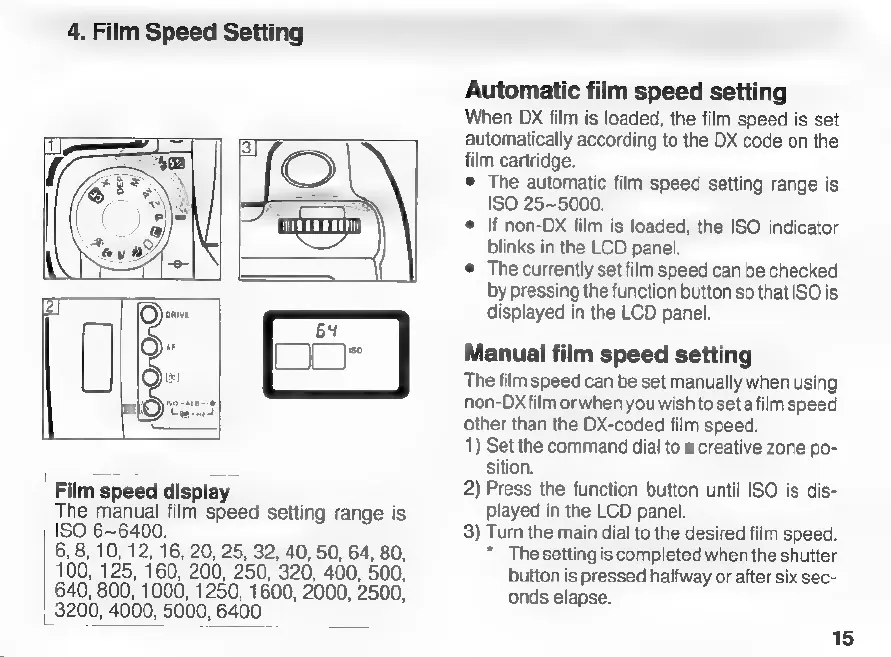
Film
speed
display
The
manual
film
speed
setting
range
is
ISO
6~6400.
6,
8,
10,
12,
16,
20, 25, 32,
40,
50,
64,
80,
100,
125,
160,
200,
250, 320, 400, 500,
640,
800,
1000,
1250,
1600,
2000,
2500,
3200,
4000,
5000,
6400
Automatic
film
speed
setting
When
DX
film
is
loaded,
the
film
speed
is
set
automatically
according
to
the
DX
code
on
the
He
cartridge.
©
The
automatic
film
speed
setting
range
is
ISO
25~5000.
e
If
non-DX
film
is
loaded,
the
ISO
indicator
blinks
in
the
LCD
panel.
©
The
currently
set
film
speed
can
be
checked
by
pressing
the
function
button
so
that
ISO
is
displayed
in
the
LCD
panel.
Manual
film
speed
setting
The
film
speed
can
be
set
manually
when
using
non-Dx
film
or
when
you
wish
to
seta
film
speed
other
than
the
DX-coded
film
speed.
1)
Set
the
command
dial
to
a
creative
zone
po-
sition.
2)
Press
the
function
button
until
ISO
is
dis-
played
in
the
LCD
panel.
3)
Turn
the
main
dial
to
the
desired
film
speed.
*
The
setting
is
completed
when
the
shutter
button
is
pressed
halfway
or
after
six
sec-
onds
elapse.
15

Related product manuals