EasyManua.ls Logo

Canon EOS A2 - Special Modes

Canon EOS A2
72 pages
Print Icon
To Next Page IconTo Next Page
To Previous Page IconTo Previous Page
Loading...
6.
X
(Flash
sync
mode)
3
40
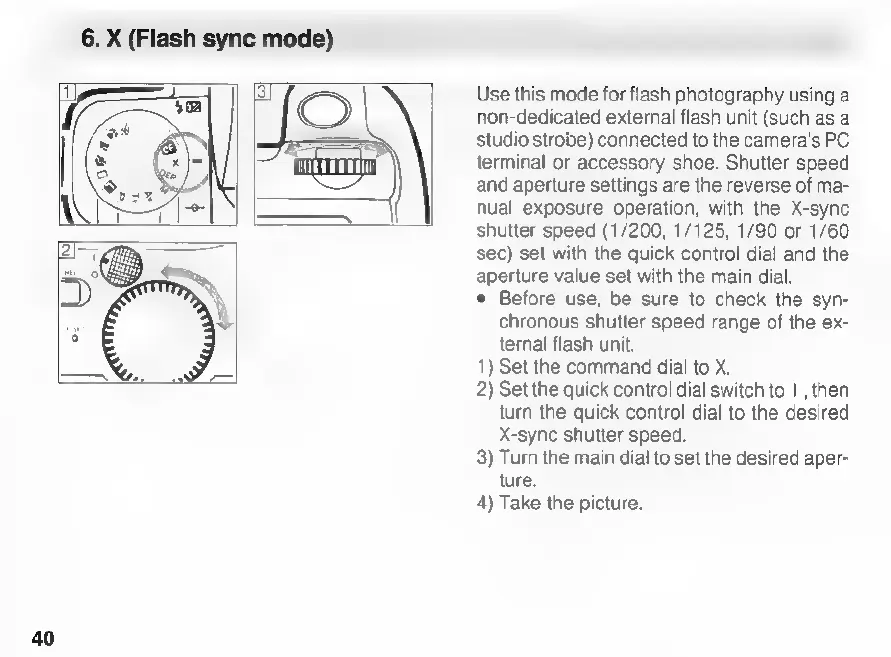
Use
this
mode
for
flash
photography
using
a
non-dedicated
external
flash
unit
(such
as
a
studio
strobe)
connected
to
the
camera's
PC.
terminal
or
accessory
shoe.
Shutter
speed
and
aperture
settings
are
the
reverse
of
ma-
nual
exposure
operation,
with
the
X-sync
shutter
speed
(1/200,
1/125,
1/90
or
1/60
sec)
set
with
the
quick
control
dial
and
the
aperture
value
set
with
the
main
dial.
e
Before
use,
be
sure
to
check
the
syn-
chronous
shutter
speed
range
of
the
ex-
ternal
flash
unit.
1)
Set
the
command
dial
to
X.
2)
Set
the
quick
control
dial
switch
to
1I
,
then
turn
the
quick
control
dial
to
the
desired
X-sync
shutter
speed.
3)
Turn
the
main
dial
to
set
the
desired
aper-
ture.
4)
Take
the
picture.

Related product manuals