EasyManua.ls Logo

Canon EOS A2 - AEB (Auto Exposure Bracketing)

Canon EOS A2
72 pages
Print Icon
To Next Page IconTo Next Page
To Previous Page IconTo Previous Page
Loading...
9.
AEB
(Auto
Exposure
Bracketing)
Use
auto
exposure
bracketing
in
AE
and
ma-
nual
exposure
modes
to
take
a
sequence
of
pictures
at
different
exposures.
When
this
function
is
set,
the
exposure
is
shifted
(brac-
keted)
for
three
successive
pictures
in
the
sequence:
correct
exposure
underexpo-
sure
overexposure.
The
bracketing
amountcan
be
setin
1/2-stop
increments
up
to
+2
stops
from
the
metered
exposure
value.
1]
m
|
ile
Auto
exposure
bracketing
is
particularly
ef-
fective
when
using
slide
film,
which
produces
noticeably
different
results
with
even
small
exposure
variations.
e
When
this
function
is
combined
with
con-
tinuous
exposure
(
œ
)
or
high-speed
continuous
exposure
(
y
),
holding
the
shutter
button
pressed
automatically
takes
three
exposures
in
sequence
while
shifting
the
exposure
for
each
picture.
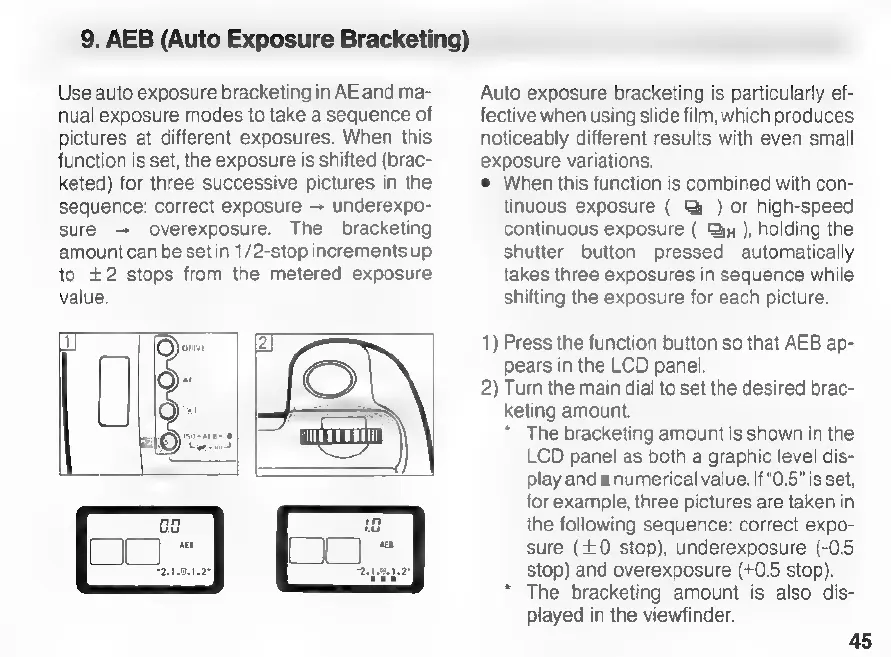
1)
Press
the
function
button
so
that
AEB
ap-
pears
in
the
LCD
panel.
2)
Turn
the
main
dial
to
set
the
desired
brac-
keting
amount.
*
The
bracketing
amount
is
shown
in
the
LCD
panel
as
both
a
graphic
level
dis-
play
and
a
numerical
value.
If
“0.5”
is
set,
for
example,
three
pictures
are
taken
in
the
following
sequence:
correct
expo-
sure
(+0
stop),
underexposure
(-0.5
stop)
and
overexposure
(+0.5
stop).
The
bracketing
amount
is
also
dis-
played
in
the
viewfinder.
45

Related product manuals