EasyManua.ls Logo

Canon EOS A2 - Custom Function Control; Setting Custom Functions

Canon EOS A2
72 pages
Print Icon
To Next Page IconTo Next Page
To Previous Page IconTo Previous Page
Loading...
V
Custom
Function
Control
50
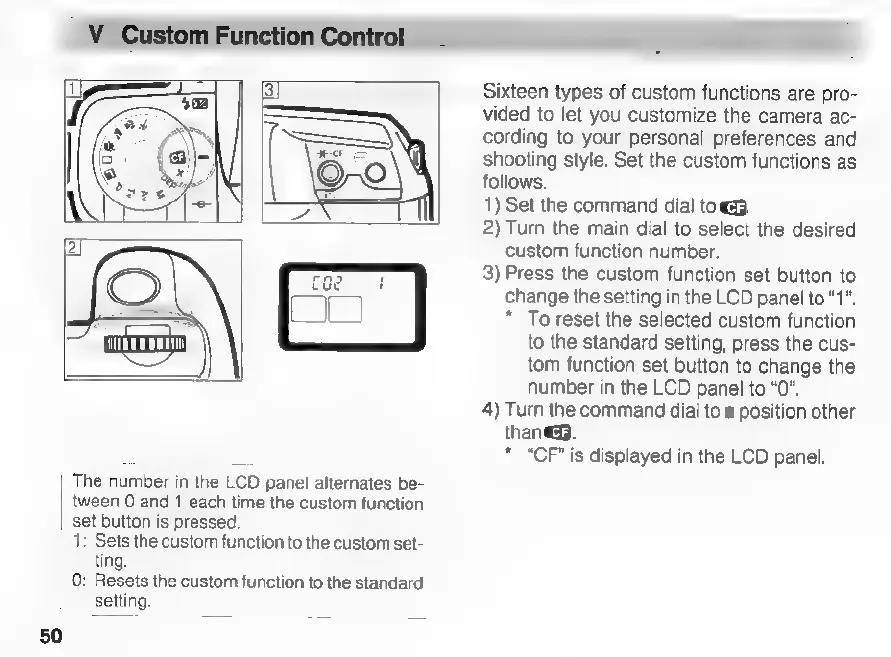
The
number
in
the
LCD
panel
alternates
be-
tween
0
and
1
each
time
the
custom
function
set
button
is
pressed
1:
Sets
the
custom
function
to
the
custom
set-
ting.
0:
Resets
the
custom
function
to
the
standard
setting.
Sixteen
types
of
custom
functions
are
pro-
vided
to
let
you
customize
the
camera
ac-
cording
to
your
personal
preferences
and
shooting
style.
Set
the
custom
functions
as
follows.
1)
Set
the
command
dial
tog.
2)
Turn
the
main
dial
to
select
the
desired
custom
function
number.
3)
Press
the
custom
function
set
button
to
change
the
setting
in
the
LCD
panel
to
“1”.
*
To
reset
the
selected
custom
function
to
the
standard
setting,
press
the
cus-
tom
function
set
button
to
change
the
number
in
the
LCD
panel
to
“0”.
4)
Turn
the
command
dial
to
a
position
other
than.
*
“CF”
is
displayed
in
the
LCD
panel.

Related product manuals