EasyManua.ls Logo

Canon EOS A2 - Viewfinder Adjustment

Canon EOS A2
72 pages
Print Icon
To Next Page IconTo Next Page
To Previous Page IconTo Previous Page
Loading...
16
5.
Adiusting
the
Viewfinder
Diopter
iD
3
You
can
adjust
the
viewfinder
diopter
to
match
your
eyesight
by
turning
the
viewfin-
der
dioptric
adjustment
knob.
If
you
are
near-
or
far-sighted,
this
feature
will
allow
you
to
see
aclear
viewfinder
image
without
wearing
glasses.
¢
The
diopter
adjustment
range
is
-2.75
to
+0.75
dpt.
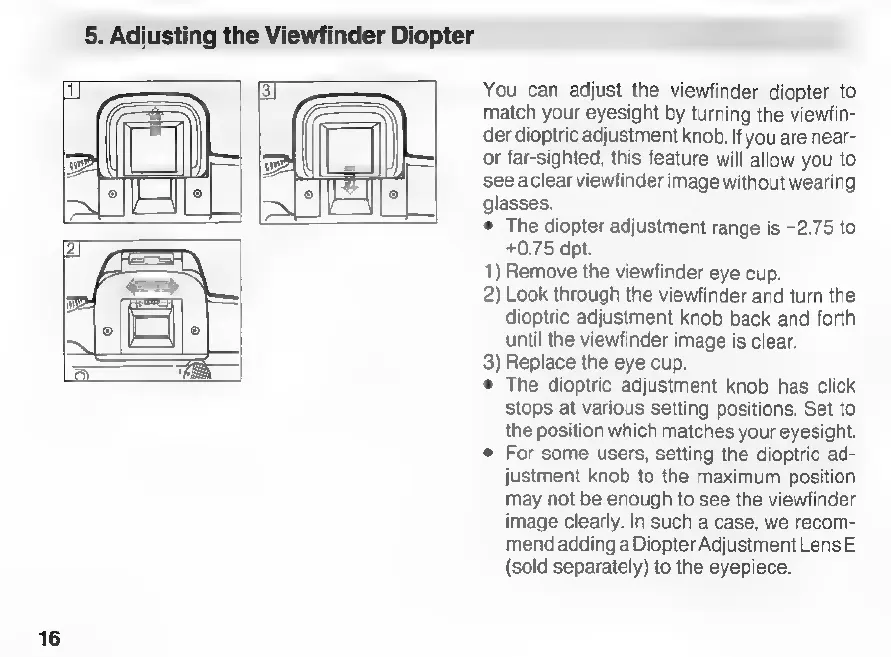
1)
Remove
the
viewfinder
eye
cup.
2)
Look
through
the
viewfinder
and
turn
the
dioptric
adjustment
knob
back
and
forth
until
the
viewfinder
image
is
clear.
3)
Replace
the
eye
cup.
e
The
dioptric
adjustment
knob
has
click
stops
at
various
setting
positions.
Set
to
the
position
which
matches
your
eyesight.
e
For
some
users,
setting
the
dioptric
ad-
justment
knob
to
the
maximum
position
may
not
be
enough
to
see
the
viewfinder
image
clearly.
In
such
a
case,
we
recom-
mend
adding
a
Diopter
Adjustment
Lens
E
(sold
separately)
to
the
eyepiece.

Related product manuals