EasyManua.ls Logo

Canon EOS A2 - Page 32

Canon EOS A2
72 pages
Print Icon
To Next Page IconTo Next Page
To Previous Page IconTo Previous Page
Loading...
32
After
setting
the
desired
compensation
amount,
it
is
a
good
idea
to
set
the
quick
control
dial
switch
to
O
to
preventacciden-
tal
alteration
of
the
setting.
To
check
the
flash
exposure
compensa-
tion
amount,
pop
up
the
flash
and
press
the
flash
button.
Flash
exposure
compensation
remains
set
until
manually
canceled.
To
cancel,
re-
peat
steps
2
and
3
to
reset
the
flash
expo-
sure
compensation
amount
to
0,
then
set
the
quick
control
dial
switch
too.
Flash
exposure
compensation
and
AE
ex-
posure
compensation
can
be
set
inde-
pendently
and
used
together.
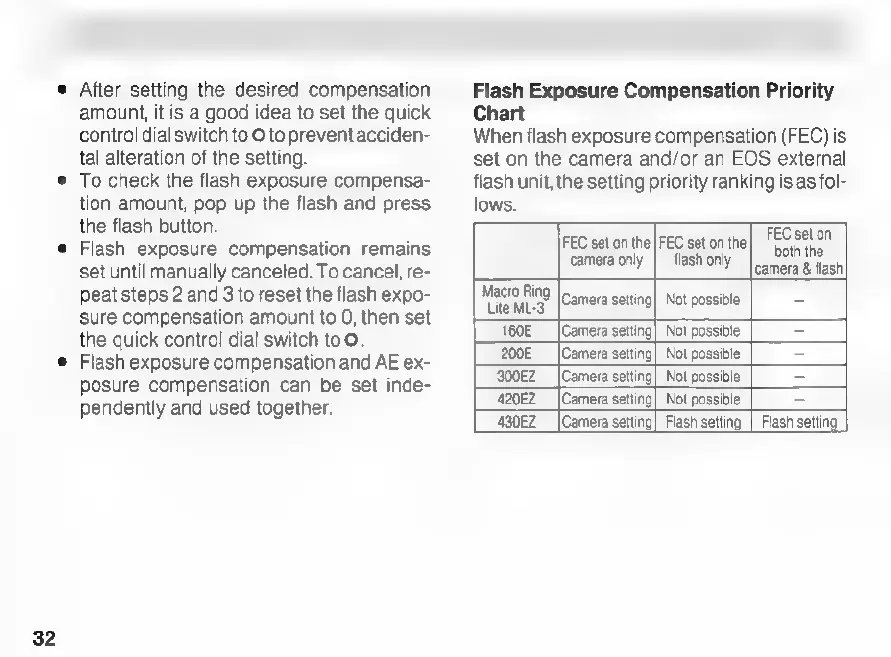
Flash
Exposure
Compensation
Priority
Chart
When
flash
exposure
compensation
(FEC)
is
set
on
the
camera
and/or
an
EOS
external
flash
unit,
the
setting
priority
ranking
is
as
fol-
lows.
FEC
set
on
the|
FEC
set
on
the|
FEC
set
on
Hz
camera
only
|
flash
only
|
camera
&
flash
Macro
Ring
Lite
ML-3
Camera
setting]
Not
possible
‘ci
160E
[Camera
setting]
Not
possible
=
200E
[Camera
setting|
Not
possible
=
300EZ__|Camera
setting)
Not
possible
=
420EZ__|Camera
setting]
Not
possible
=
430EZ
(Camera
setting|
Flash
setting
|
Flash
setting

Related product manuals