EasyManua.ls Logo

Canon EOS A2 - Display Panel Overview; LCD Information Display

Canon EOS A2
72 pages
Print Icon
To Next Page IconTo Next Page
To Previous Page IconTo Previous Page
Loading...
Display
Panel
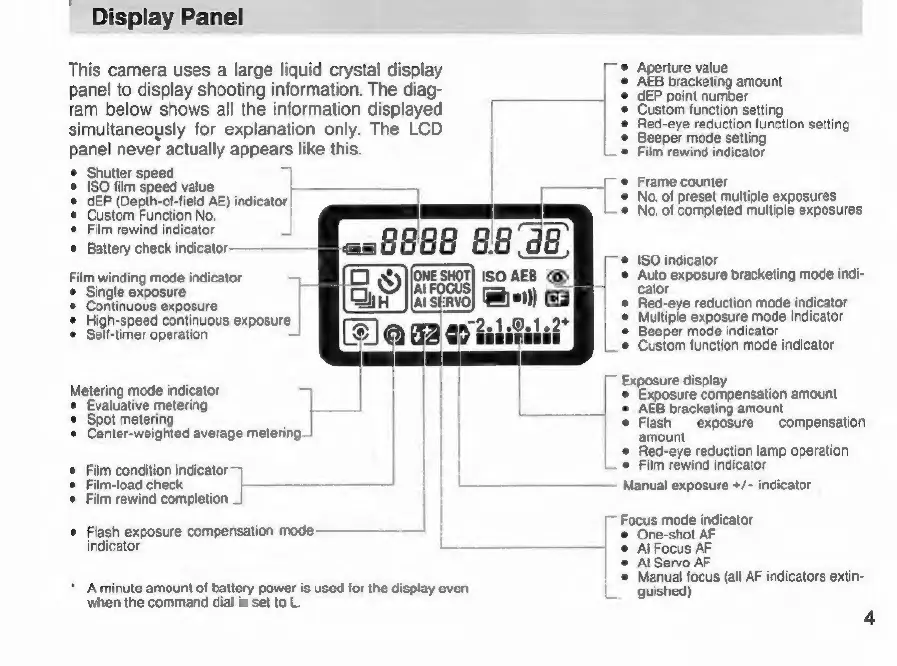
This
camera
uses
a
large
liquid
crystal
display
panel
to
display
shooting
information.
The
diag-
ram
below
shows
all
the
information
displayed
simultaneously
for
explanation
only.
The
LCD
panel
never
actually
appears
like
this.
©
Shutter
speed
©
ISO
film
speed
value
=
©
dEP
(Depth-of-field
AE)
indicator
|
Custom
Function
No.
|
©
Film
rewind
indicator
©
Battery
check
indicator
Film
winding
mode
indicator
1
©
Single
exposure
|
œ
Continuous
exposure
©
High-speed
continuous
exposure
|
e
Self-timer
operation
JAI
FOCUS|
AI
SERVO)
Metering
mode
indicator
Evaluative
metering
|
©
Spot
metering
©
Center-weighted
average
metering.
©
Film
condition
indicator
~}
Film-load
check
©
Film
rewind
completion
_|
e
Flash
exposure
compensation
mode
indicator
L-
*
A
minute
amount
of
battery
power
is
used
for
the
display
even
when
the
command
dial
is
set
to
L.
one
snor)
zl
1
©
e
Aperture
value
AEB
bracketing
amount
dEP
point
number
Custom
function
setting
Red-eye
reduction
function
setting
Beeper
mode
setting
Film
rewind
indicator
.
Frame
counter
©
No.
of
preset
multiple
exposures
©
No.
of
completed
multiple
exposures
©
ISO
indicator
e
Auto
exposure
bracketing
mode
indi-
cator
Red-eye
reduction
mode
indicator
Multiple
exposure
mode
indicator
Beeper
mode
indicator
Custom
function
mode
indicator
Exposure
display
©
Exposure
compensation
amount
©
AEB
bracketing
amount
e
Flash
exposure
compensation
amount
*
Red-eye
reduction
lamp
operation
©
Film
rewind
indicator
~
Manual
exposure
+/~
indicator
[~
Focus
mode
indicator
©
One-shot
AF
e
Al
Focus
AF
e
Al
Servo
AF
©
Manual
focus
(all
AF
indicators
extin-
guished)
4

Related product manuals