12
Loading Paper
Load paper by following the procedure below. In this section, A4 custom size paper is used as an example.
Confirmation
Confirm the paper types that can be loaded.
"Basic Operations" > "Available Paper Stock" in the User's Guide
Preparation
Pre-register the paper types you are going to use.
"Registering Paper Types in the Paper Database," on p. 14
Operation
Load paper in the paper drawer.
"Loading Paper into the Paper Drawer," on p. 15
Registration
Specify the loaded paper size and type for the paper drawer.
"Registering Custom Paper Types," on p. 16
▀
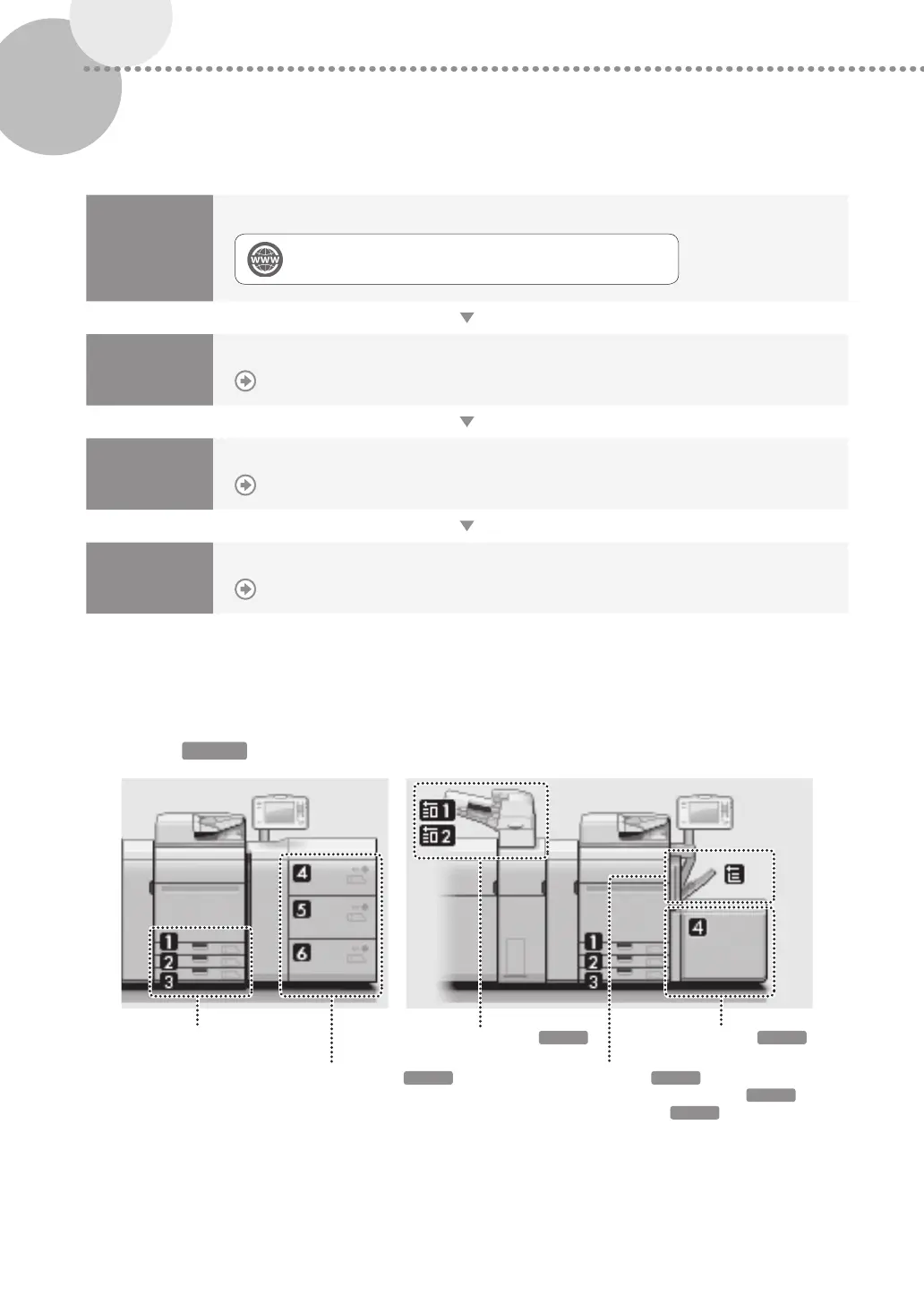
Paper Source
This section describes available paper sources. Paper that can be loaded differs, depending on the paper sources. The
following description includes the optional products as well as the standard paper drawers. The optional products are
indicated with
OPTION
.
Paper Drawer
Multi-drawer Paper Deck-C
Document Insertion Unit-N
Stack Bypass-C
Stack Bypass Alignment Tray-D
Long Sheet Tray-B
POD Deck Lite-C
OPTION
OPTION
OPTION
OPTION
OPTION
OPTION











 To Next Page