15
Loading Paper
▀
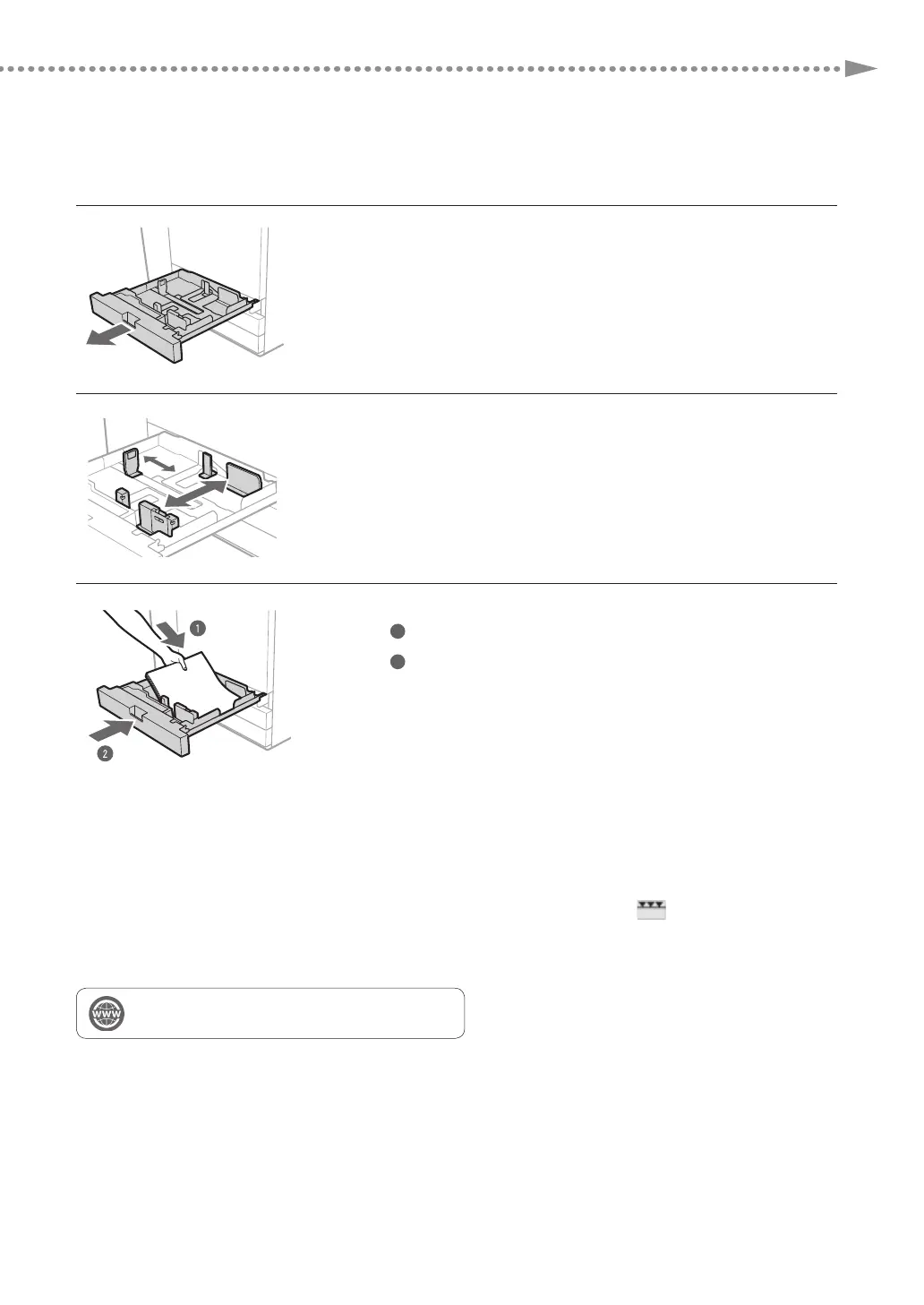
Loading Paper into the Paper Drawer
1
Open the paper drawer.
•
Gently pull out the paper drawer until it stops.
2
Adjust the position of the paper drawer guides.
•
Slide each guide while squeezing it on the top to align for the
desired paper size.
3
Load the paper stack into the paper drawer.
1
Load the paper stack against the right wall of the paper drawer.
2
Gently push the paper drawer back into the machine until it clicks
into place in the closed position.
N
TE
•
Make sure to fan the paper stack, and align the edges before loading paper.
•
Curled paper must be straightened out prior to use.
•
Make sure that the height of the paper stack does not exceed the loading limit mark (
).
•
When loading pre-punched paper, transparencies/clear film, tab paper, and envelopes, make sure to load paper in
an appropriate orientation as the paper orientation differs, depending on the paper source.
"Maintenance" > "Loading Paper" in the User's Guide











 To Next Page