7
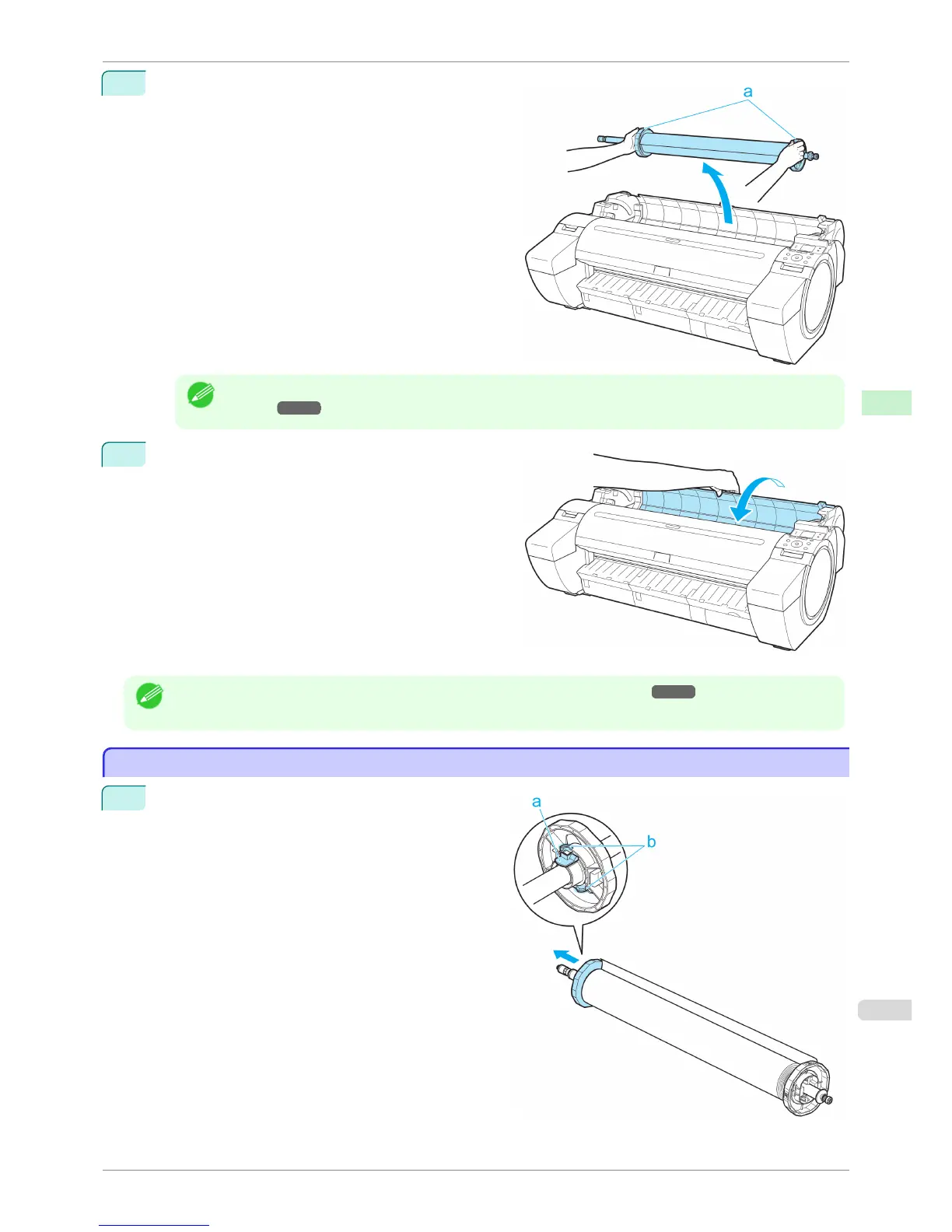
Holding the Roll Holder flange (a), remove the holder
from the Roll Holder Slot.
Note
• For instructions on removing the Roll Holder from rolls, see "Removing the Roll Holder from
Rolls." ➔P.345
8
Holding it at the positions indicated, close the Roll Cov-
er.
Note
• To load new roll paper in the printer at this point, see "Loading Rolls in the Printer." ➔ P.339
Removing the Roll Holder from Rolls
Removing the Roll Holder from Rolls
1
Lift the Holder Stopper lever (a) from the shaft side to
unlock it. Holding the Holder Stopper at the position
indicated (b), remove it from the Roll Holder.
iPF780
Removing the Roll Holder from Rolls
User's Guide
Handling and Use of Paper Handling rolls
345


 To Next Page
 Loading...











