116 External Connections
External Connections
This chapter explains how to connect your camcorder to an
external device such as a TV, VCR, or computer.
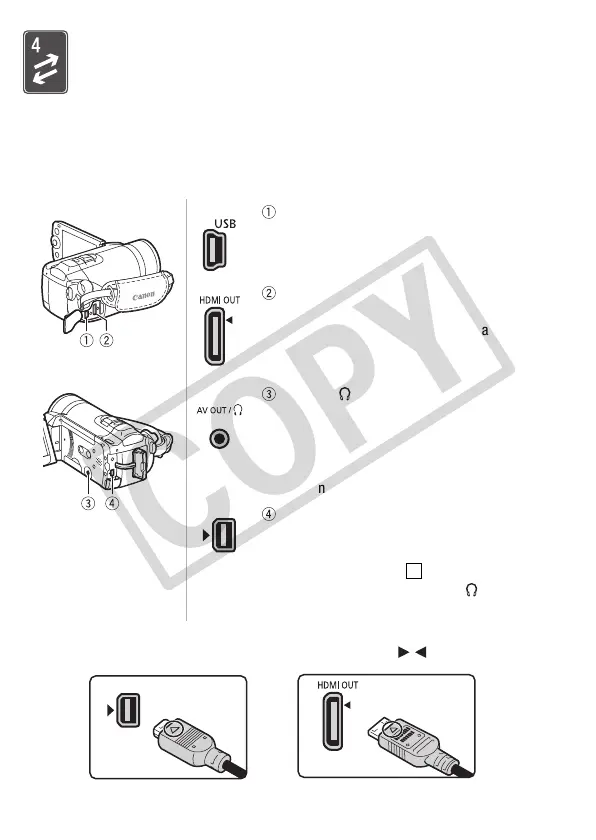
Terminals on the Camcorder
* When connecting a cable to the camcorder, make sure to align the triangle marks
on the cable's connector and on the camcorder's terminal ( ).
USB Terminal
Access: Open the side terminal cover.
HDMI OUT Terminal*
Access: Open the side terminal cover.
The HDMI OUT terminal offers a high-quality
digital connection that combines audio and
video in a single convenient cable.
AV OUT/ Terminal
Access: Open the LCD panel.
Sound from the built-in speaker will be muted
while the STV-250N Stereo Video Cable is
connected to the camcorder. Adjust the volume
on the connected TV.
COMPONENT OUT Terminal*
Access: Open the rear terminal cover.
The component video terminal is for video only.
When you use connection do not forget the
audio connections using the AV OUT/
terminal.
2











 To Next Page