Video 77
Audio Recording Level
You can adjust the audio recording level of the built-in or an external
microphone. You can display the audio level indicator while recording.
POINTS TO CHECK
• Select a recording program other than [ Underwater] or [ Surface].
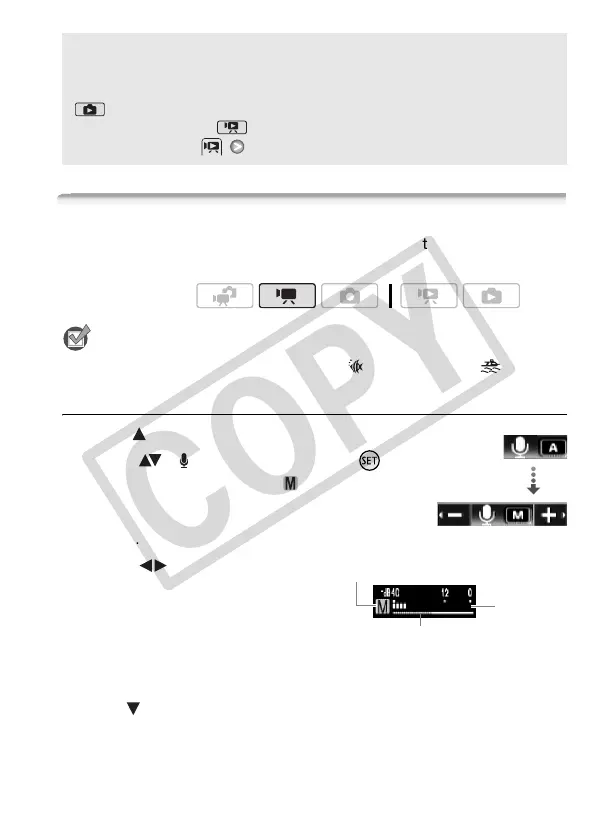
Manual Adjustment of the Audio Recording Level
1 Open ( ) the joystick guide.
2 Select ( ) [ Mic. Level] and press .
The manual adjustment icon will appear
to the left of the audio level indicator and the
manual adjustment bar (orange) will appear
below it.
3 Adjust ( ) the audio level as
necessary.
As a guideline, adjust the audio
recording level so that the audio level
meter will go to the right of the
-12 dB (yellow area) mark only
occasionally.
4 Hide ( ) the joystick guide.
• The audio level selected will be locked and the audio level
adjustment bar will turn white.
About the Data Code
With every scene or photo recorded, the camcorder keeps a data code
(date/time of recording, information about the camera setup, etc.). In
mode, this information is displayed on the bottom bar and as
information icons; in mode, you can select the information to be
displayed with the [Data Code] setting.
Operating modes:
Mic. Level
Audio level
indicator
Audio level adjustment bar
Manual audio level adjustment











 To Next Page