136 Additional Information
Setup Menus
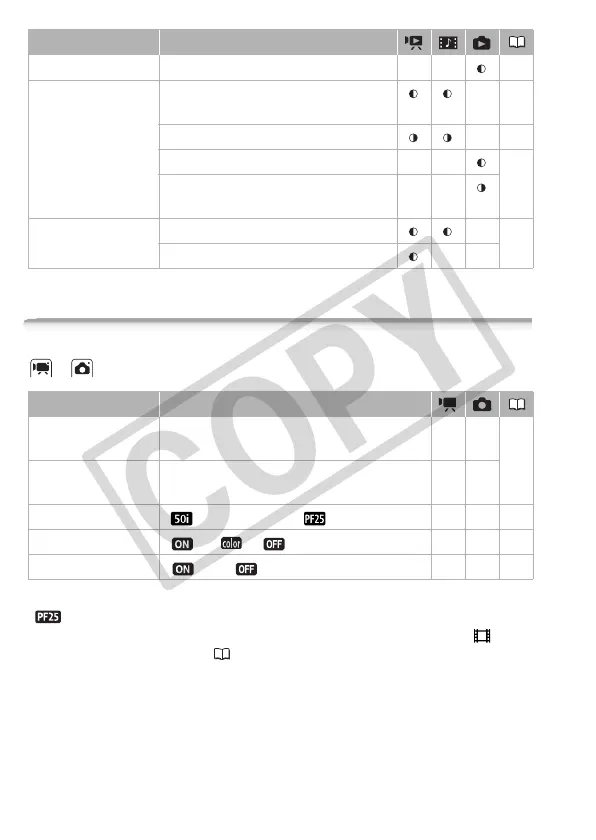
/ Camera Setup 1
[Frame Rate]: Selects the frame rate to be used when recording.
[ PF25]: 25 frames per second, progressive. Using this frame rate will
give your recordings a cinematic look. When combined with the [ Cine
Mode] recording program ( 62), the cinematic look will be enhanced.
[x.v.Colour]: Uses a color space with an extended gamut to achieve
deeper colors, closer to real life.
• Use this function to record video only when you intend to play back your
recordings on an HDTV compatible with x.v.Colour
TM
, connected to the
camcorder using an HDMI cable. If recordings made with x.v.Colour
TM
[Rotate] – – – 102
[Delete] [All Scenes], [All Scenes (this date)],
[This Scene], [Selected Scenes]
–54
[All Scenes], [This Scene] – 85
[No], [Yes] – – 94
[All Photos], [This Photo],
[Selected Photos]
––
[Scene Search] [Calendar Screen], [Date Selection] – 49
[Scenes with Faces] – –
Menu item Setting options
Menu item Setting options
[Rec Media for
Movies]
[Built-in Mem.], [Mem. Card] zz39
[Rec Media for
Photos]
[Built-in Mem.], [Mem. Card] zz
[Frame Rate] [ 50i (Standard)], [ PF25] z ––
[x.v.Colour] [ On ], [ Off] z ––
[Auto Rotate] [On], [ Off] – z –











 To Next Page