Additional Information 137
are played back on a non-compatible TV, colors may not be reproduced
correctly.
[Auto Rotate]: Photos that were recorded in portrait orientation (by turning
the camcorder on its side), will be rotated automatically and displayed
correctly during playback.
/ Camera Setup 2
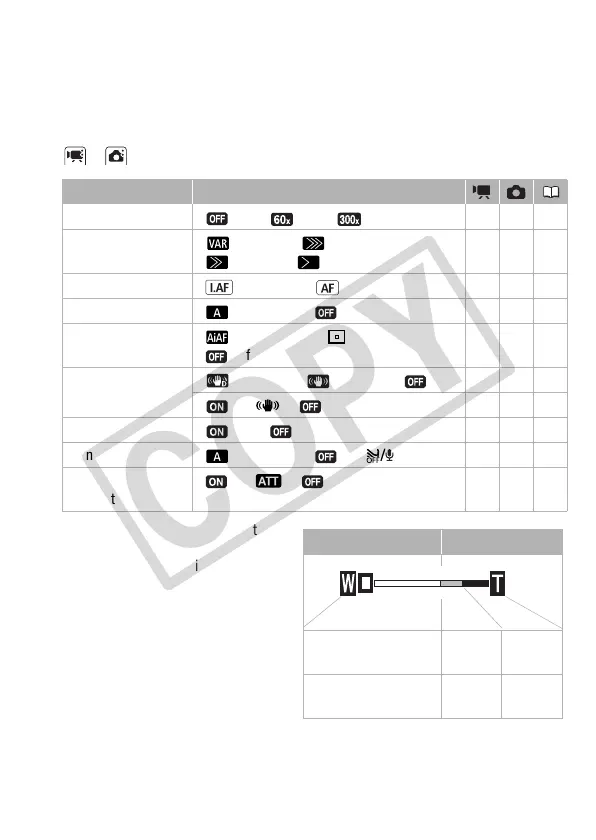
[Digital Zoom]: Determines the
operation of the digital zoom.
The color of the indicator indi-
cates the zoom.
• When activated, the cam-
corder will switch automatically
to digital zoom when you zoom
in beyond the optical zoom
range.
• With the digital zoom the
image is digitally processed, so
the image resolution will deteri-
orate the more you zoom in.
Menu item Setting options
[Digital Zoom] [ Off], [ 60x], [ 300x] z ––
[Zoom Speed] [Variable], [ Speed 3],
[ Speed 2], [ Speed 1]
zz43
[AF Mode] [ Instant AF], [ Normal AF] zz –
[AF-Assist Lamp] [ Automatic], [ Off] – z 98
[Focus Priority] [ AiAF Frames], [ Center Frame],
[Off]
– z –
[Image Stabilizer] [ Dynamic], [ Standard], [ Off] z ––
[On], [ Off] – z –
[Auto Slow Shutter] [On], [ Off] z ––
[Wind Screen] [ Automatic], [ Off ] z ––
[Microphone
Attenuator]
[On], [ Off] z ––
Optical zoom Digital zoom
White Light
blue
Dark
blue
Up to 15x 15x -
60x
60x -
300x











 To Next Page