Preparations 35
First Time Settings
Setting the Date and Time
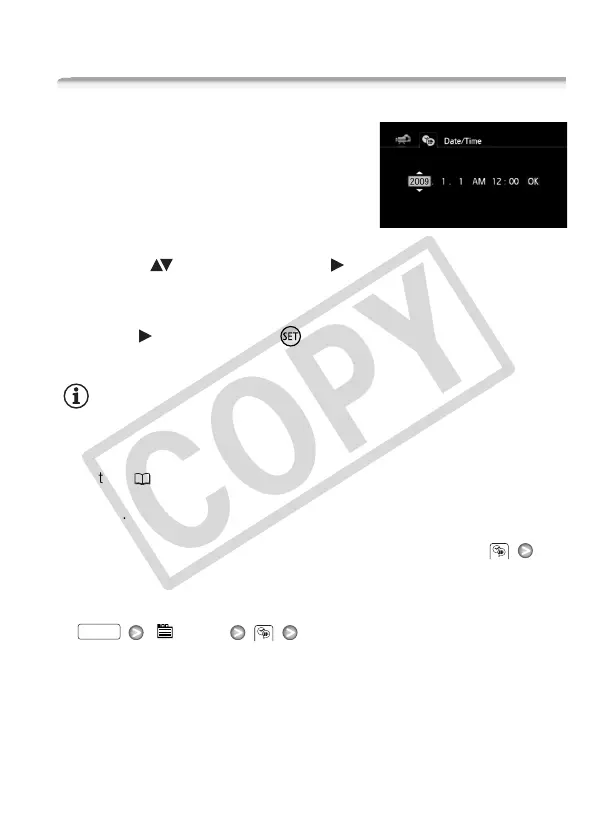
You will need to set the date and time of
the camcorder before you can start
using it. The [Date/Time] screen will
appear automatically when the cam-
corder’s clock is not set.
When the [Date/Time] screen appears,
the year will be selected.
1 Change ( ) the year and move ( ) to the month.
2 Change the rest of the fields (month, day, hour and minutes) in the
same way.
3 Select ( ) [OK] and press to start the clock and close the
setup screen.
NOTES
• When you do not use the camcorder for about 3 months, the built-in
rechargeable lithium battery may discharge completely and the date
and time setting may be lost. In such case, recharge the built-in lithium
battery ( 167) and set the time zone, date and time again.
• The date appears in a year-month-day format only in the first setup
screen. In subsequent screen displays the date and time will appear as
day-month-year (for example, [1.Jan.2009 12:00 AM]). You can change
the date format and the clock format (12/24 hours) with the
[Date Format] setting.
• You can also change the date and time later on (not during the initial
setup). Open the [Date/Time] screen from the setup menus:
[ Menu] [Date/Time]
FUNC.











 To Next Page