24 Preparations
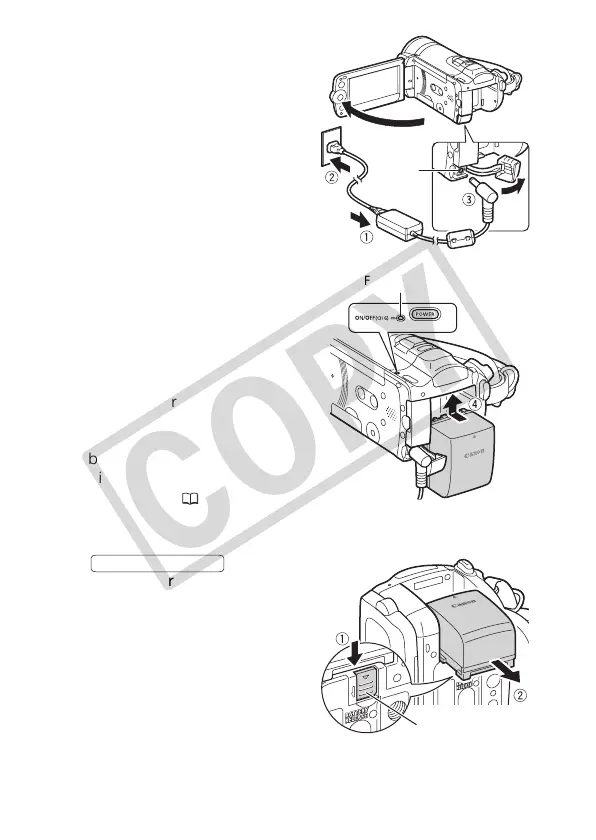
1 Connect the power cord to the
compact power adapter.
2 Plug the power cord into a power outlet.
3 Connect the compact power
adapter to the camcorder’s DC IN
terminal.
4 Attach the battery pack to the
camcorder.
Press the battery pack softly into the
battery attachment unit and slide it up
until it clicks in place.
5 Charging will start when the
camcorder is turned off.
• If the camcorder was on, the green
ON/OFF (CHG) indicator will go out
when you turn off the camcorder.
After a moment, the ON/OFF (CHG)
indicator will start flashing in red
(battery pack charging). The red ON/
OFF (CHG) indicator will go out when
the battery pack is fully charged.
• If the indicator flashes quickly, refer to
Troubleshooting ( 148).
To remove the battery pack
1Slide in the
direction of the arrow and hold it
pressed down.
2 Slide the battery pack down and
then pull it out.
ON/OFF (CHG) (charge) indicator
DC IN
terminal
BATTERY RELEASE switch
BATTERY RELEASE











 To Next Page