Preparations 33
Selecting an Option from the FUNC. Menu
The following is an example of selecting a FUNC. menu option in
mode (the operation is similar in mode). In playback modes, the
operation varies depending on the function selected so refer to the rel-
evant chapter as necessary.
1Press .
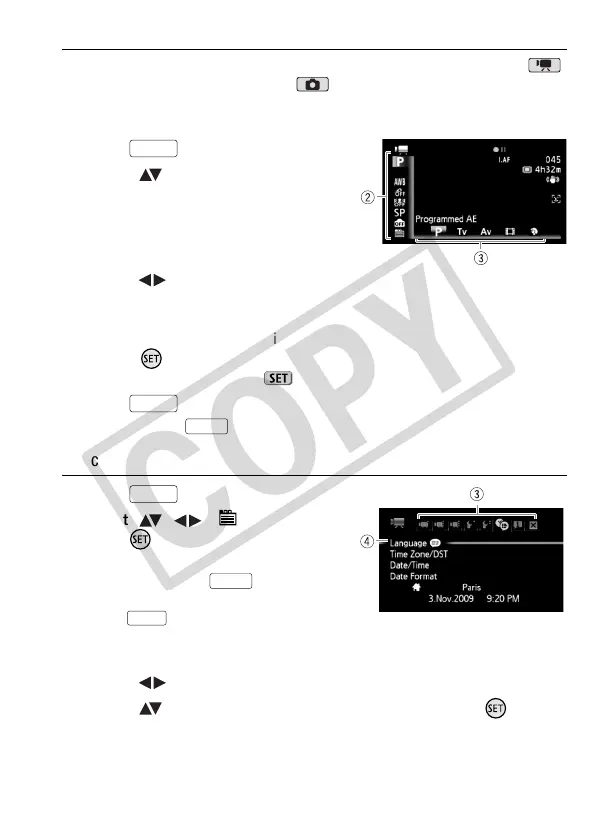
2 Select ( ) the icon of the function
you want to change from the left
side column.
Menu items not available will appear
grayed out.
3 Select ( ) the desired setting from the available options at the
bottom bar.
• The selected option will be highlighted in orange.
• With some settings you will need to make further selections and/or
press . Follow the additional operation guides that will appear on
the screen (such as the icon, small arrows, etc.).
4 Press to save the settings and close the menu.
You can press to close the menu at any time.
Selecting an Option from the Setup Menus
1Press .
2 Select ( , ) [ Menu] and
press to open the setup
menus.
You can also hold pressed
down for more than 1 second or
press on the wireless
controller to open directly the setup
menus screen.
3 Select ( ) the tab of the desired menu.
4 Select ( ) the setting you want to change and press .
• The orange selection bar indicates the menu setting currently
selected. Menu items not available appear grayed out.
FUNC.
FUNC.
FUNC.
FUNC.
FUNC.
MENU











 To Next Page