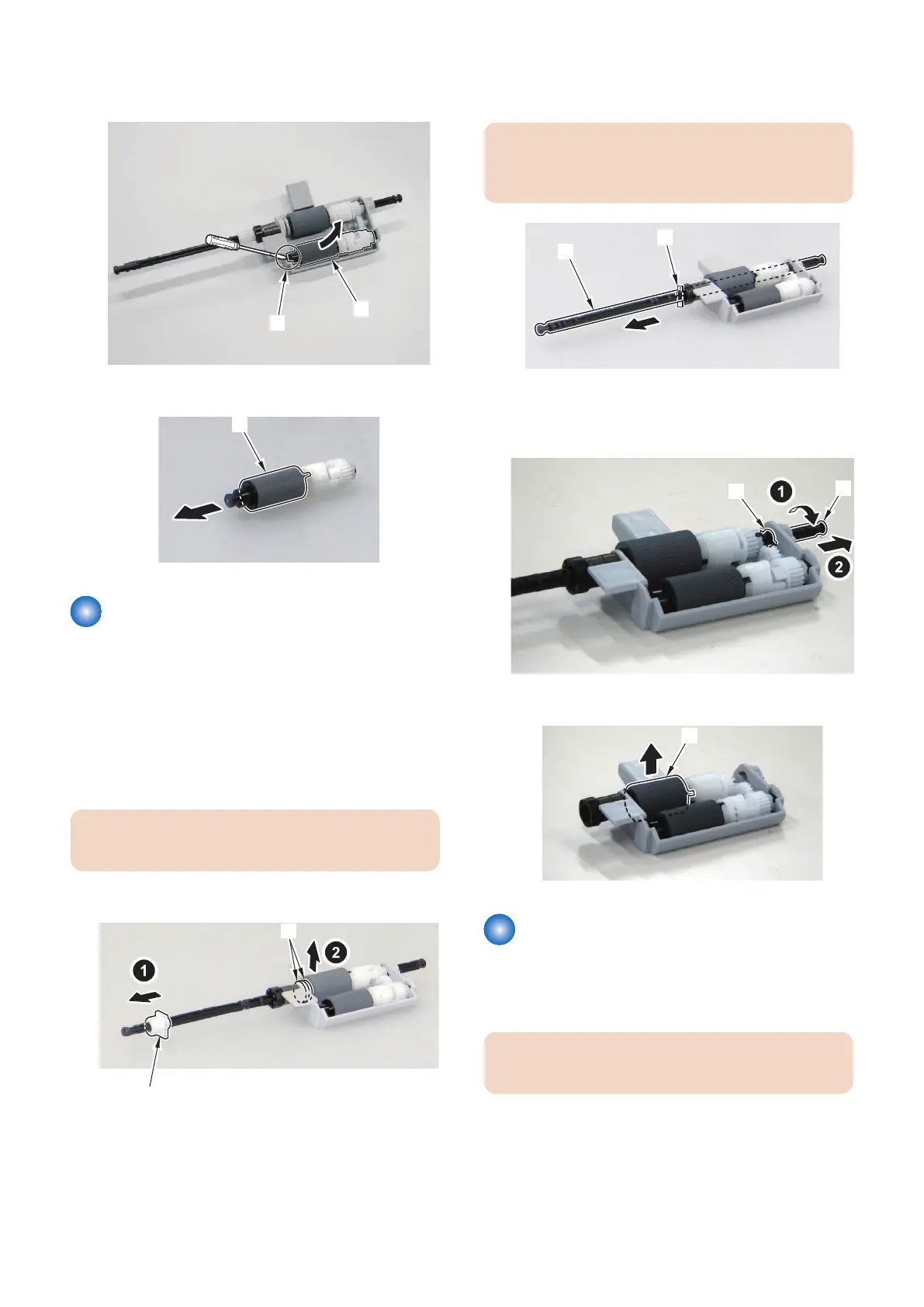
1. Insert the end of the flat-blade screwdriver into the
[A] part to remove the ADF Pickup Roller Unit [1].
2. Remove the ADF Pickup Roller [1].
Removing the ADF Separation
Roller
■ Preparation
1. Remove the ADF Roller Unit.(Refer to “Removing the
ADF Roller Unit” on page 136)
■ Procedure
CAUTION:
Do not touch the surface of the roller.
1. Remove the bushing [1] and the 2 plastic E-rings [2].
2. Slide the Roller Shaft [1] to remove the parallel pin
[2] and the bushing [3].
CAUTION:
Be careful not to lose the parallel pin [2] at assembly/
disassembly.
3. Turn the Roller Shaft [1] in the direction of the arrow
and fit the projection [2] to the hole of the Roller
Holder to remove.
4. Remove the ADF Separation Roller [1].
Removing the ADF Separation
Pad
■ Procedure
CAUTION:
Do not touch the surface of the roller or pad.
4. Disassembly/Assembly
138











 To Next Page