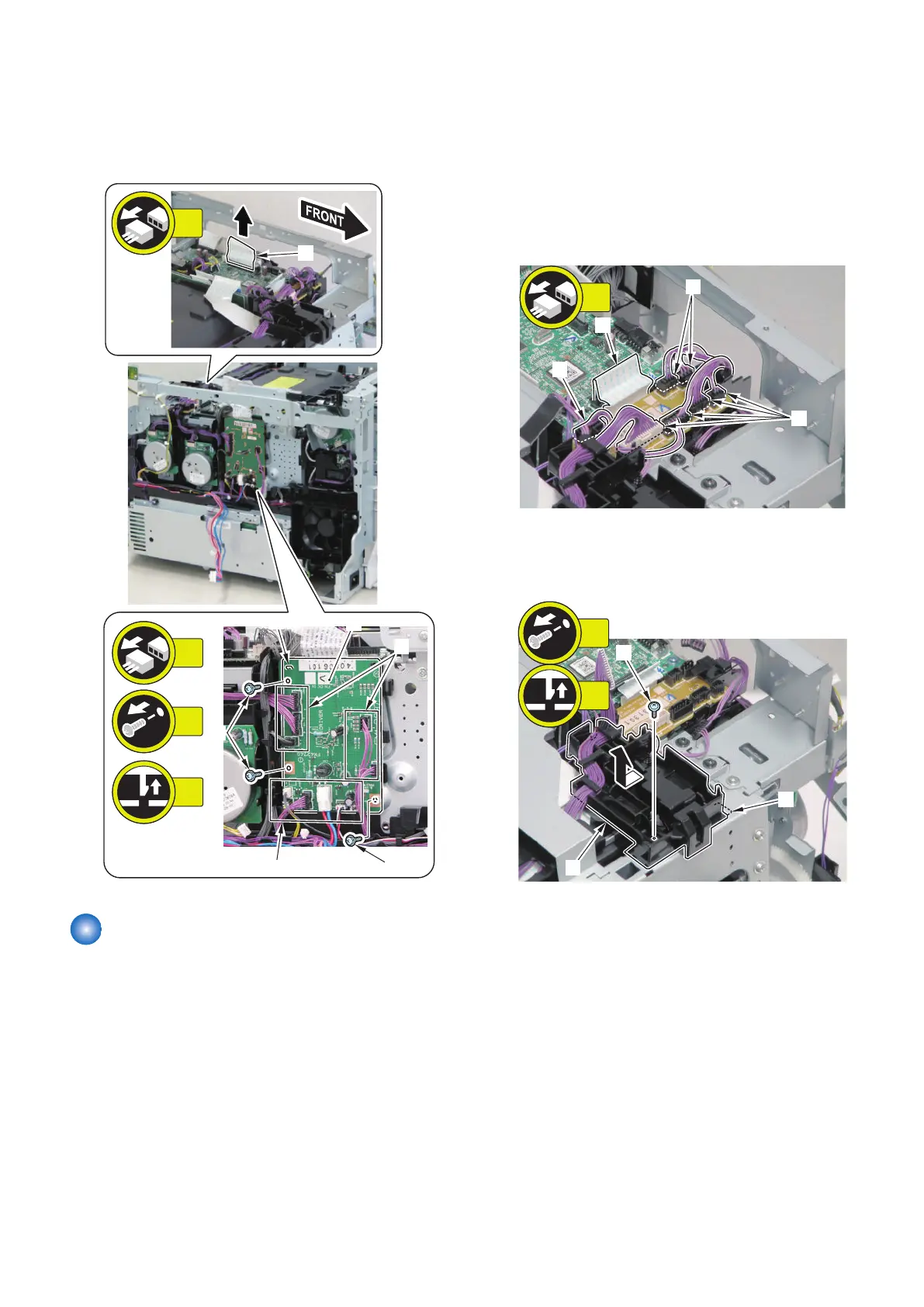
2. Remove the Driver PCB [1].
• 11 connectors [2]
• 1 flat cable [3]
• 3 screws [4]
• 1 claw [5]
[5]
[1]
[2]
[4]
[2]
[4]
[3]
3x
1x
11x
1x
Removing the Relay PCB
■ Preparation
1. Removing the Right Cover.(Refer to “Removing the
Right Cover” on page 120)
2. Removing the Left Cover.(Refer to “Removing the
Left Cover” on page 118)
3. Removing the Rear Upper Cover.(Refer to
“Removing the Rear Upper Cover” on page 123)
4. Removing the ADF Unit + Reader Unit.(Refer to
“Removing the ADF Unit + Reader Unit” on page
130)
5. Removing the Right Front Cover.(Refer to
“Removing the Right Front Cover” on page 121)
6. Removing the Upper Cover.(Refer to “Removing the
Upper Cover” on page 125)
■ Procedure
1. Disconnect the flat cable [1] and the 7 connectors
[2].
2. Remove the harness guide [1].
• 1 screw [2]
• 1 hook [3]
4. Disassembly/Assembly
168











 To Next Page