3. Remove the ADF Unit + Reader Unit.(Refer to
“Removing the ADF Unit + Reader Unit” on page
130)
4. Separate the ADF Unit from the Reader Unit.(Refer
to “Separating the ADF Unit + Reader Unit” on page
131)
5. Remove the Reader Unit Upper Cover Unit.(Refer to
“Removing the Reader Unit Upper Cover” on page
144)
■ Procedure
CAUTION:
Be sure to perform "After replacing CIS unit (Refer to
“After replacing CIS units” on page 149)" when
replacing the CIS unit, respectively.
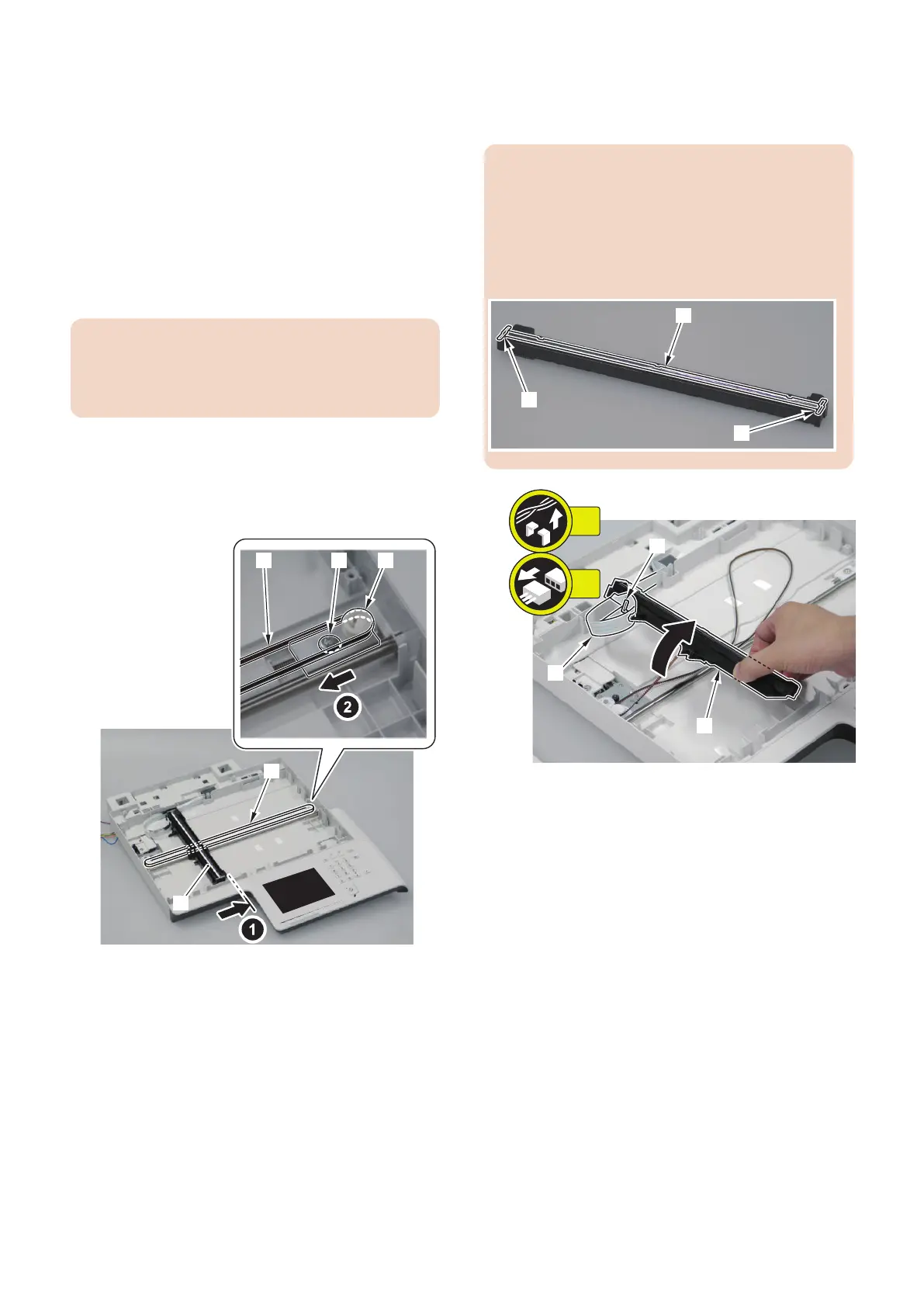
1. Pull the Drive Belt [1] to move the CIS Unit [2].
2. Loosen the screw [3] and move the Pulley Holder [4]
in the direction of the arrow to remove the Drive Belt
[1].
3. Remove the CIS Unit Mount [1] and remove the flat
cable [2].
• 1 guide [3]
CAUTION:
• When assembling/disassembling the copyboard
glass, take care not to lose the 2 CIS unit spacers
[1].
• When assembling/disassembling the copyboard
glass, do not touch the copy reading area [2] of the
CIS unit.
4. Disassembly/Assembly
147











 To Next Page