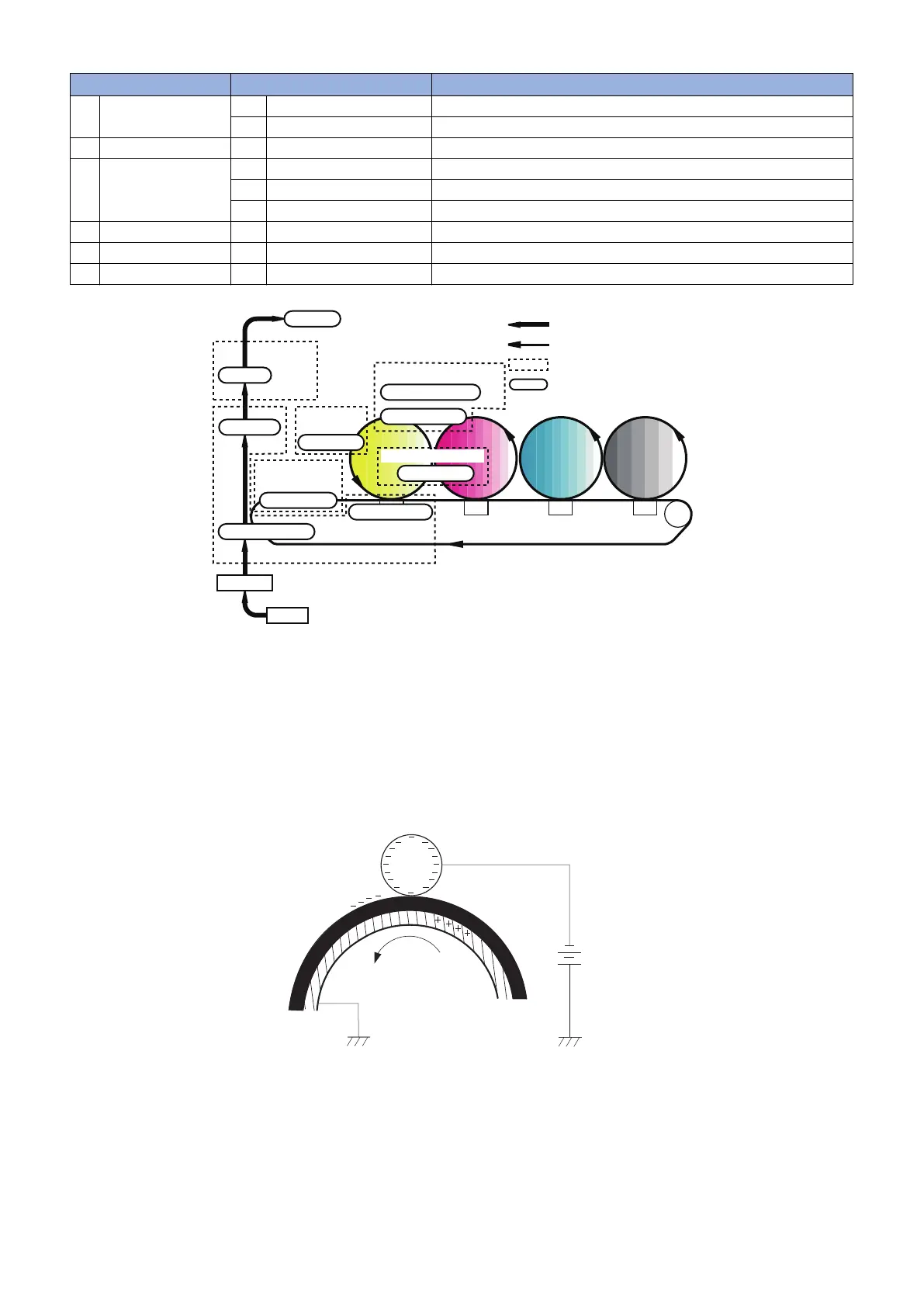
Block Step Description
1 Static latent image
forming
1 Primary charging Charge the photosensitive drum surface negatively.
2 Laser beam exposure Form a static latent image on the photosensitive drum.
2 Development 3 Development Deposit toner to visualize the static latent image.
3 Transfer 4 Primary transfer Transfer the toner image on the photosensitive drum to the ITB.
5 Secondary transfer Transfer the toner image on the ITB to the paper.
6 Separation Separate the paper from the ITB.
4 Fixing 7 Fixing Fix the toner image on the paper.
5 ITB cleaning 8 ITB cleaning Clean the residual toner on the ITB.
6 Drum cleaning 9 Drum cleaning Clean the residual toner on the photosensitive drum.
Flow of paper
Rotation of ITB/photosensitive drum
Block
Step
Static image formation block
Drum cleaning block
2. Laser beam exposure
9. Drum cleaning
1. Primary charging
4.
Primary transfer
Transfer block
5. Secondary transfer
ITB cleaning
block
8. ITB cleaning
Registration
Pickup
Fixing block
Delivery
7. Fixing
6. Separation
Development
block
3. Development
■ Block 1 : Static latent image forming block
This block consists of 2 steps to form a static latent image on the photosensitive drum.
● Step 1: Primary charging
Before forming a static latent image, the photosensitive drum surface should be charged negatively.
This product employs the method to charge the photosensitive drum directly from the primary charging roller, applying the DC
negative bias in order to negatively charge the photosensitive drum surface.
DC bias
Photosensitive drum
Primary charging roller
● Step 2: Laser beam exposure
Expose the photosensitive drum with laser beams to form a static latent image.
The static latent image is formed by laser beam scanning that neutralizes or strips negative potentials on the scanned parts.
2. Technical Explanation
31











 To Next Page