27
Basic Functions
Recording
E
Zooming
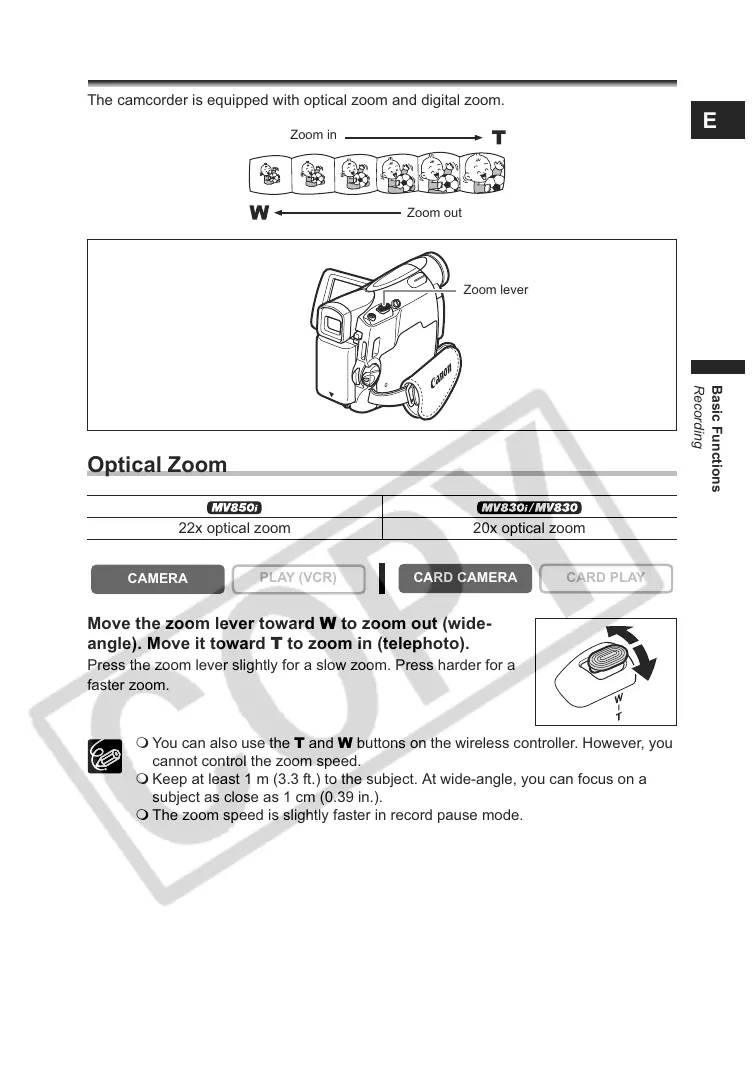
The camcorder is equipped with optical zoom and digital zoom.
Optical Zoom
Move the zoom lever toward W to zoom out (wide-
angle). Move it toward T to zoom in (telephoto).
Press the zoom lever slightly for a slow zoom. Press harder for a
faster zoom.
You can also use the T and W buttons on the wireless controller. However, you
cannot control the zoom speed.
Keep at least 1 m (3.3 ft.) to the subject. At wide-angle, you can focus on a
subject as close as 1 cm (0.39 in.).
The zoom speed is slightly faster in record pause mode.
22x optical zoom 20x optical zoom
CAMERA
PLAY (VCR)
CARD CAMERA
CARD PLAY
Zoom in
Zoom out
Zoom lever


 To Next Page