55
Advanced Functions
Recording
E
Setting the Shutter Speed
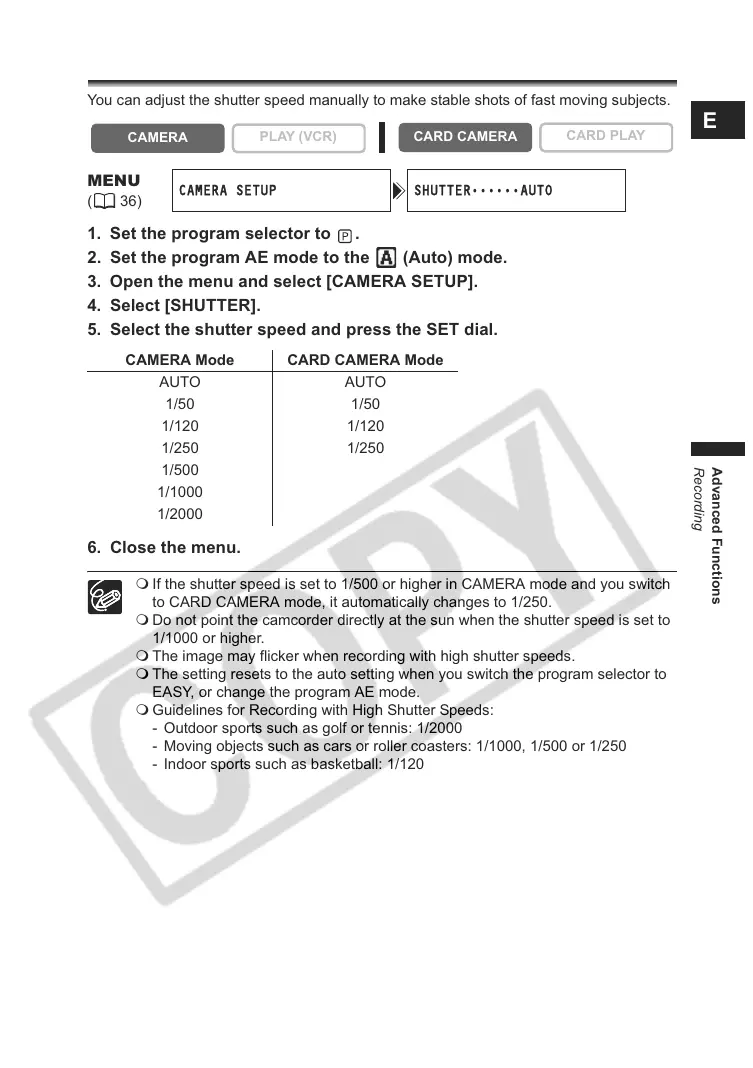
You can adjust the shutter speed manually to make stable shots of fast moving subjects.
1. Set the program selector to .
2. Set the program AE mode to the (Auto) mode.
3. Open the menu and select [CAMERA SETUP].
4. Select [SHUTTER].
5. Select the shutter speed and press the SET dial.
6. Close the menu.
If the shutter speed is set to 1/500 or higher in CAMERA mode and you switch
to CARD CAMERA mode, it automatically changes to 1/250.
Do not point the camcorder directly at the sun when the shutter speed is set to
1/1000 or higher.
The image may flicker when recording with high shutter speeds.
The setting resets to the auto setting when you switch the program selector to
EASY, or change the program AE mode.
Guidelines for Recording with High Shutter Speeds:
- Outdoor sports such as golf or tennis: 1/2000
- Moving objects such as cars or roller coasters: 1/1000, 1/500 or 1/250
- Indoor sports such as basketball: 1/120
CAMERA
PLAY (VCR)
CARD CAMERA
CARD PLAY
MENU
(36)
CAMERA SETUP SHUTTER
••••••
AUTO
CAMERA Mode CARD CAMERA Mode
AUTO AUTO
1/50 1/50
1/120 1/120
1/250 1/250
1/500
1/1000
1/2000



 To Next Page