Canon PC880/860 Operator’s Manual ENGLISH
15
INSTALLING THE COPIER
2
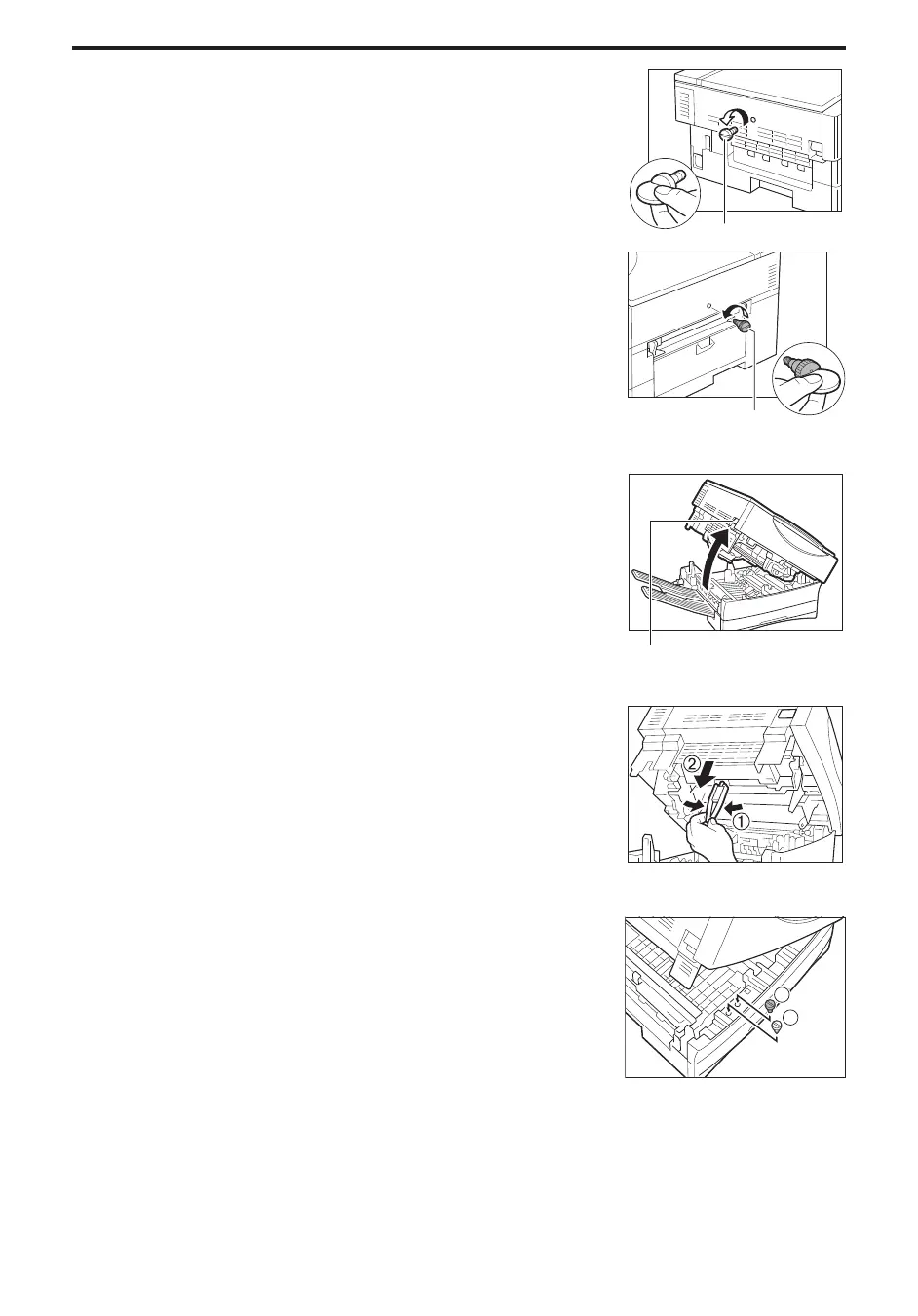
Remove shipping attachment
a
on the left side of the main unit.
(In step 5, insert shipping attachment
a
in the shipping
attachment holder.)
Shipping attachment
a
Remove shipping attachment
b
on the right side of the main unit.
(In step 5, insert shipping attachment
b
in the shipping
attachment holder.)
NOTICE:
I You will need these shipping attachments whenever you transport the
copier, so store them in the shipping attachment holder. (See
“Transporting the Copier and Repacking,” on p. 26.)
MEMO:
I The edge of a coin will allow for easy removal.
Shipping attachment
b
...............................
3
Lift the main unit lever on the left side of the main unit and open
the main unit.
Lever
...............................
4
Squeeze and remove the attachment inside the copier under the
top of the main unit.
...............................
5
Insert shipping attachment
a
and
b
in the shipping attachment
holder, removed in step 2.
...............................



 To Next Page