Canon PC880/860 Operator’s Manual ENGLISH
33
COPYING FEATURES
Adjusting the Copy Exposure
Automatic Exposure Control
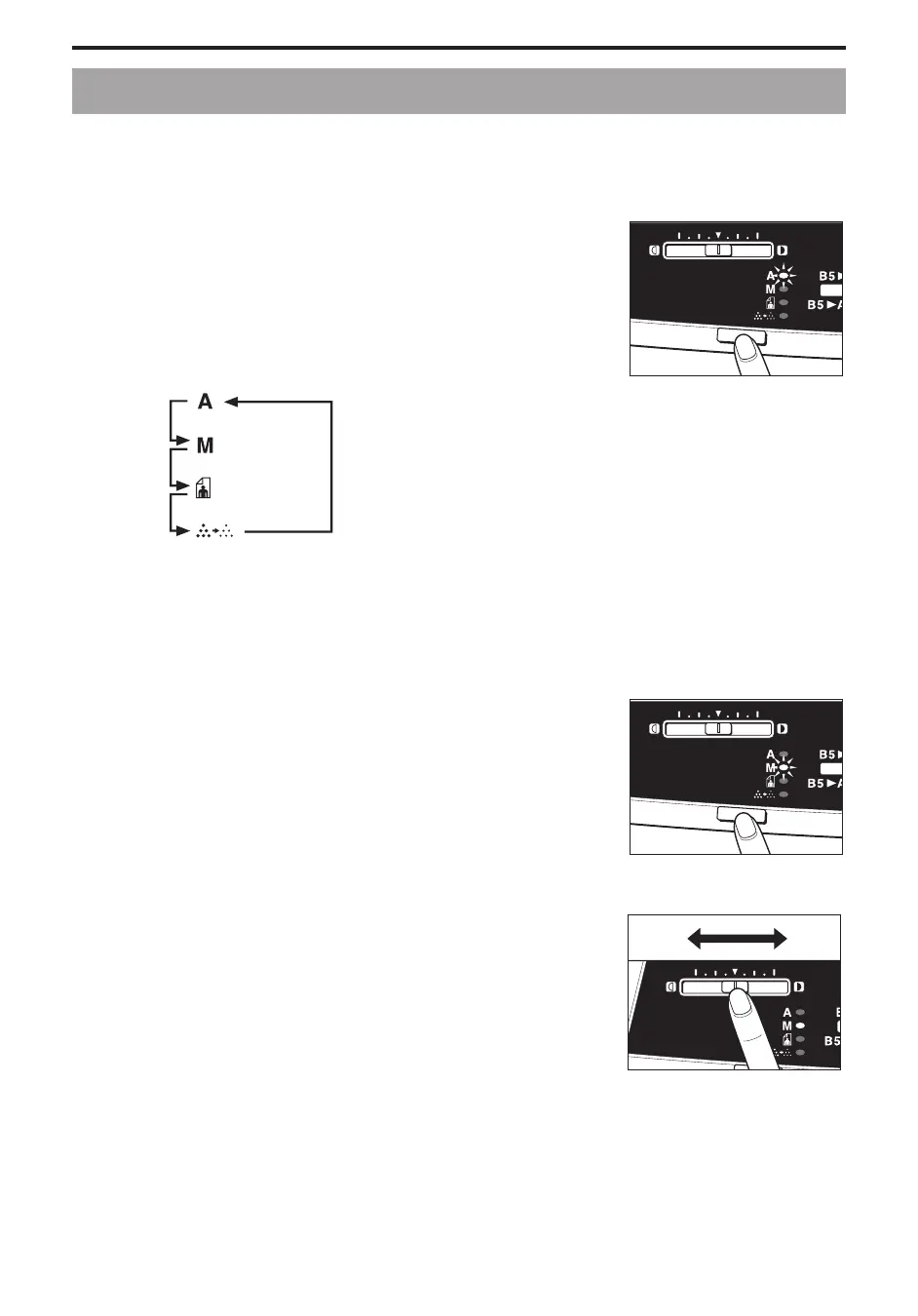
The copy exposure is preset to AE (Automatic Exposure Control).
The copier automatically adjusts the copy exposure to the appropriate level for each original.
1
Press the Exposure Mode Select key until the Auto Exposure (A)
lights.
NOTICE:
I Moving the Exposure Adjustment lever while making copies in the AE
does not change the copy exposure.
MEMO:
I Each press of the Exposure Mode Select key lights the Exposure Mode
indicator in the following order:
...............................
Manual Exposure Control
This mode allows you to manually select the desired exposure by moving the Exposure Adjustment lever.
1
Press the Exposure Mode Select key until the Manual Exposure
(M) lights.
...............................
2
Adjust the copy exposure level by sliding the Exposure
Adjustment lever.
To make darker copies, move the lever to the right. (Useful for
copying light originals, such as documents written in pencil.)
To make lighter copies, move the lever to the left. (Useful for
copying originals with dark background, such as newspapers.)
...............................



 To Next Page