Canon PC880/860 Operator’s Manual ENGLISH
22
Adjusting a Cassette to Hold a Different Paper Size (Only
When Using the Optional Universal Cassette (250 sheets))
If you want to load a new paper size in the optional universal cassette, follow the procedure described below to
adjust the cassette guides.
You can adjust the cassette to hold the following standard paper sizes : A4 and A5.
MEMO:
I You can load LTR, LGL and STMT size paper. (See “To load LTR and LGL size paper in the cassette” on p. 24.)
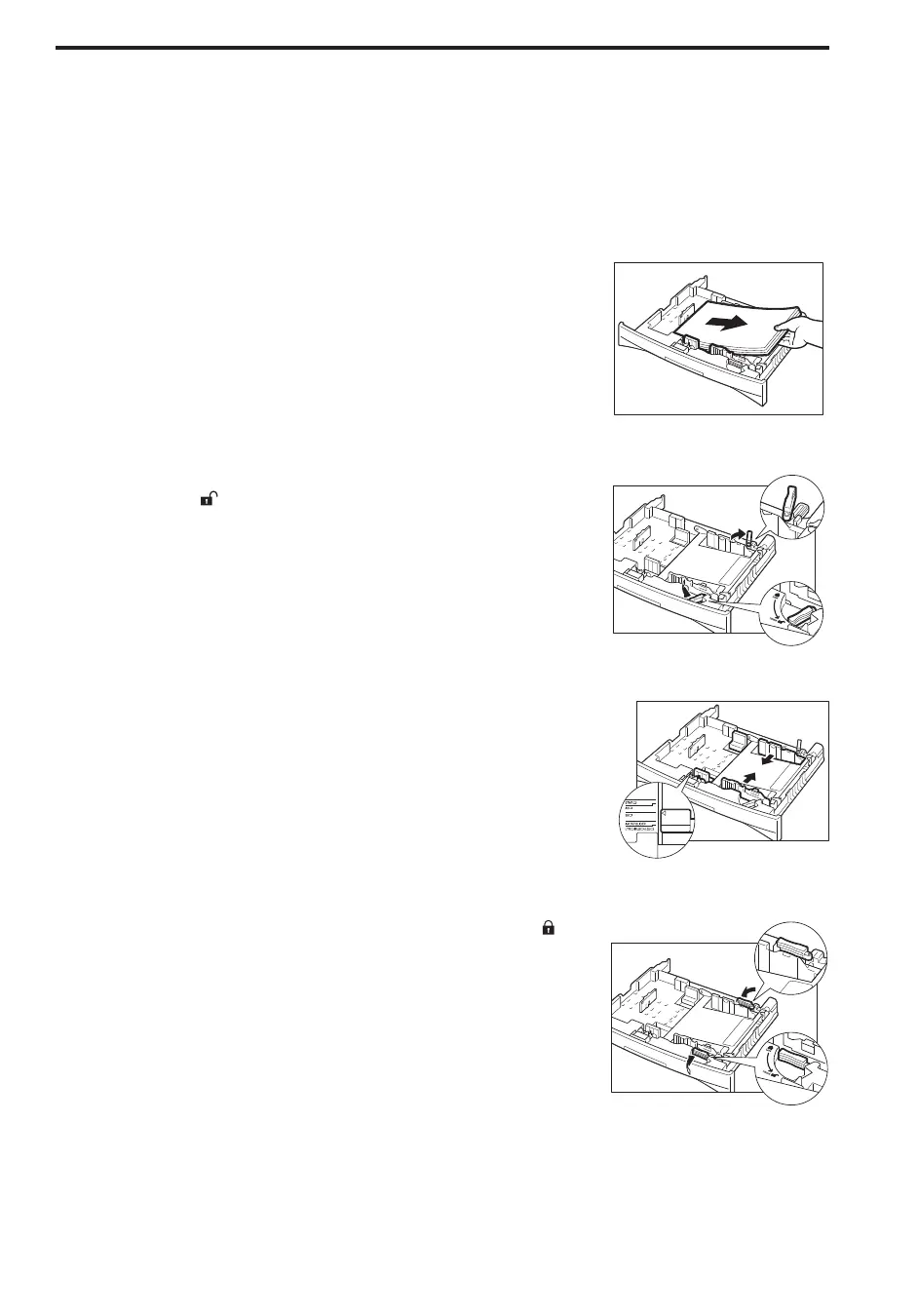
1
Remove the cassette from the main unit, and remove all loaded
copy paper.
...............................
2
Align the left and right locking levers on the width guides to the
“Unlock (
)” position.
...............................
3
Slide the width guides to the width mark for the paper to be
loaded in the cassette.
...............................
4
Return the locking levers on the width guides to the “Lock ( )”
position.
...............................



 To Next Page