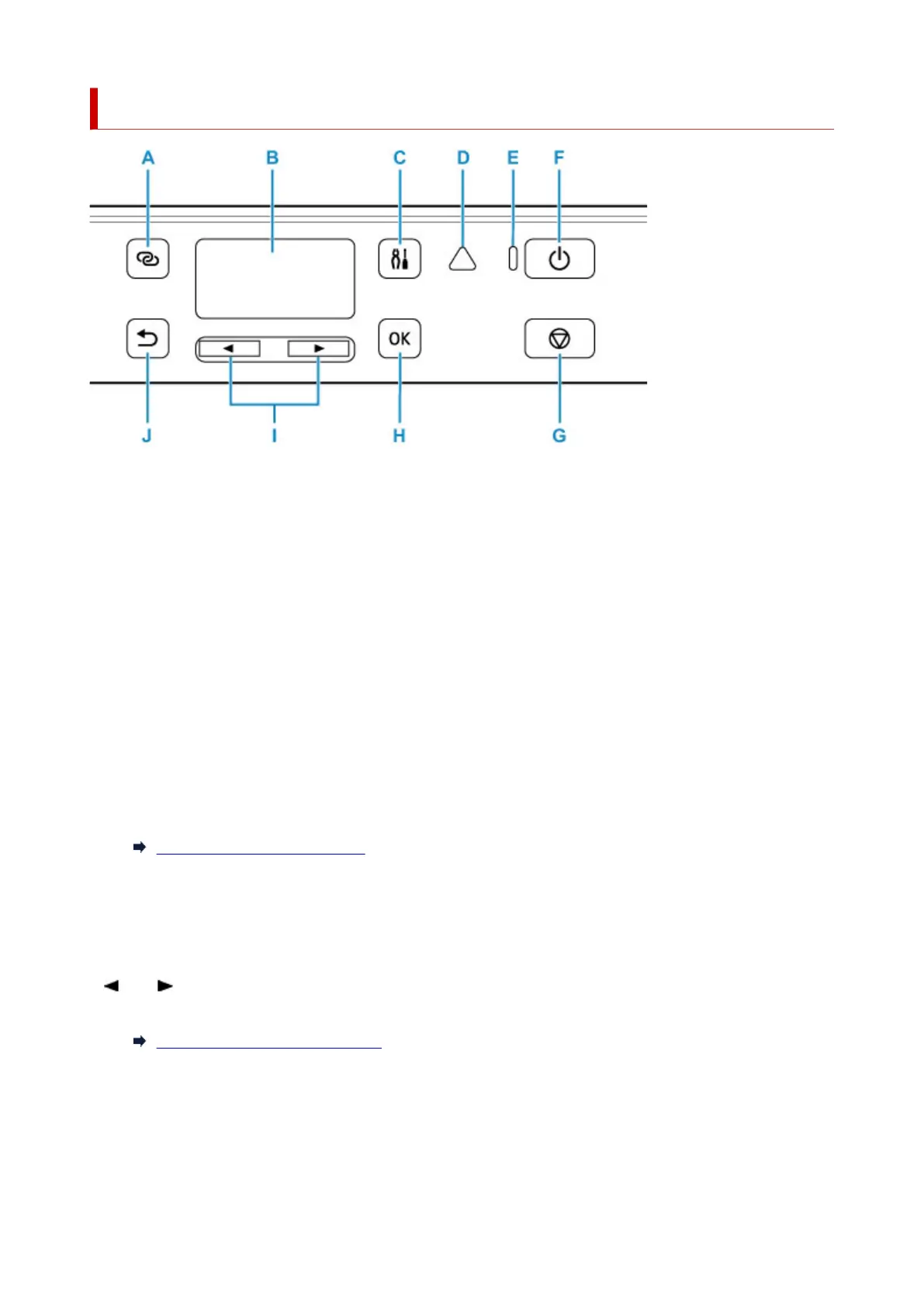
Operation Panel
A: Wireless connect button
To set wireless router information in the printer directly from a smartphone or other such device (without
having to do any procedures at the router), hold down this button.
B: LCD (Liquid Crystal Display)
Displays messages, menu items, and the operational status.
C: Setup button
Displays the Setup menu screen. With this menu, you can perform printer maintenance and change
printer settings. Also used for selecting the input mode.
D: Alarm lamp
Lights or flashes when an error occurs.
E: ON lamp
Lights after flashing when the power is turned on.
F: ON button
Turns the power on or off.
Turning the Printer On and Off
G: Stop button
Cancels operation when printing is in progress or when selecting a menu item.
H: OK button
Finalizes your selection of items. Also used to resolve errors.
I: and buttons
Used to select a setting item. These buttons are also used for entering characters.
Selecting a Menu or Setting Item
J: Back button
Returns the LCD to the previous screen.
176












 To Next Page