Setting Page
103
[Shutter Speed Limit (Lower)]
If [Exposure] is set to [Auto], [Auto (Flickerless)], [Auto (Flickerless2)] ( ), or [Auto (Aperture-priority
AE)] ( ), a minimum shutter speed can be selected.
[Shutter Speed Limit (Upper)]
If [Exposure] is set to [Auto], [Auto (Flickerless)], or [Auto (Aperture-priority AE)] ( ), a maximum shutter speed
can be selected.
[Shutter Speed]
If [Exposure] is set to [Auto (Shutter-priority AE)] or [Manual], you can fix the shutter speed.
• Slower shutter speeds generate residual images in video when capturing a moving subject.
• When capturing a moving subject, selecting a higher shutter speed can reduce blurry video capture.
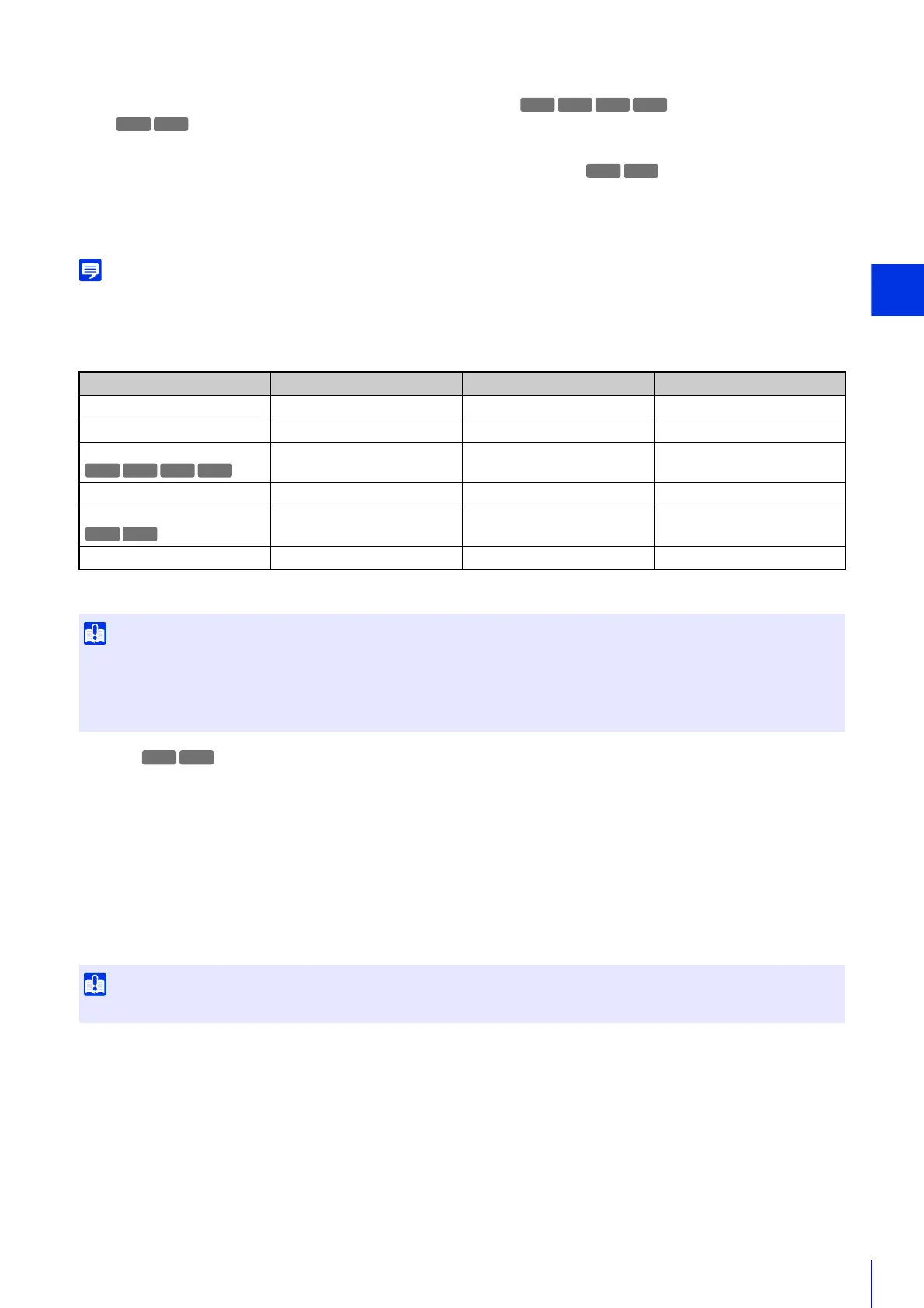
The table below describes the selectable range of shutter speed according to the setting for [Exposure].
* You cannot select a speed lower than [Shutter Speed Limit (Lower)].
[Aperture]
If [Auto (Aperture-priority AE)] or [Manual] is selected for [Exposure], set a desired aperture.
Moving the slider to the left closes the aperture and darkens the image. Moving the slider to the right opens the aperture
and brightens the image.
[Gain]
If [Manual] is selected for [Exposure], set the sensitivity to affect brightness.
Moving the slider to the left darkens the video, and moving it to the right brightens video.
[Exposure Compensation]
When [Exposure] is set other than [Manual], you can adjust the brightness of the video by selecting the [Exposure
Compensation].
[Metering Mode]
When [Exposure] is set a value other than [Manual], you can selects a metering mode.
[Center-Weighted]
Performs photometry with the entire screen center-weighted.
Even if there is a slight difference in light and dark around the screen, subjects near the center will have the appropriate
exposure.
Use this when the subject is near the center of the screen.
[Average]
Performs photometry with the average of the entire screen.
[Exposure] [Shutter Speed Limit (Lower)] [Shutter Speed Limit (Upper)] [Shutter Speed]
[Auto] 1/2 – 1/16000 (sec.) 1/2 – 1/16000 (sec.)* -
[Auto (Flickerless)] 1/2 – 1/50 (sec.) 1/100 – 1/16000 (sec.) -
[Auto (Flickerless2)]
1/2 – 1/50 (sec.) - -
[Auto (Shutter-priority AE)] - - 1/2 – 1/16000 (sec.)
[Auto (Aperture-priority AE)]
1/2 – 1/16000 (sec.) 1/2 – 1/16000 (sec.)* -
[Manual] - - 1/1 – 1/16000 (sec.)
• If a traffic signal, electronic scoreboard, etc. is captured the video may flicker. In this case, try changing [Exposure] to [Auto (Shutter-
priority AE)] and then select a shutter speed lower than 1/100 seconds so that the condition improves.
• Setting a slow shutter speed may prevent the intelligent function from working correctly. Select a shutter speed that suits the capture
conditions and purpose.
The setting is not available if [Smart Shade Control] is set to [Auto].
S90x
HM4x
H730
S30 S31 S80x
HM4x
H730
HM4x



 To Next Page