3
25
English
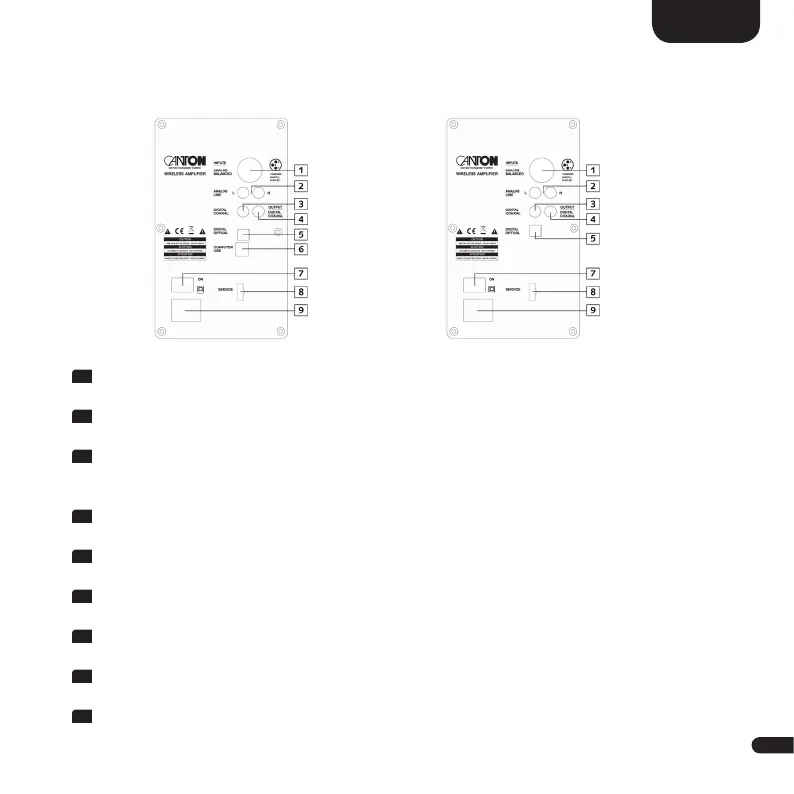
1
ANALOG BALANCED / BAL / [XLR]
Balanced analog input for a highest possible interference-free connection.
2
ANALOG LINE L+R / LIN / [AUX]
For the connection to the line outputs of your analog playback device.
3
DIGITAL COAXIAL / COA / [DVD]
For the connection to the digital coaxial audio output on your TV or digital
device.
4
OUTPUT DIGITAL COAXIAL
For an optional cable connection between master and slave speaker.
5
DIGITAL OPTICAL / OPT / [TV]
For connecting to the optical audio output on your TV or digital device.
6
COMPUTER USB / USB / [PC]
For a direct connection to a computer (only master module).
7
POWER SWITCH
Turns the speaker on resp. off.
8
SERVICE CONNECTION
Use only for Canton customer service.
9
POWER INPUT
For connection to the mains supply.
Connection terminal (Back side)
Master Slave


 To Next Page