26
English
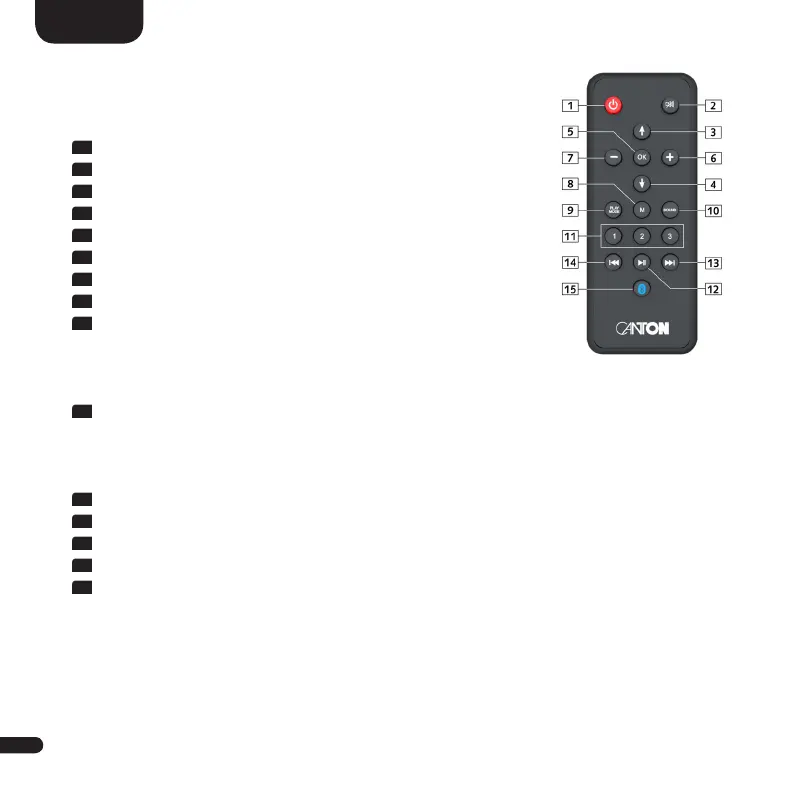
1
Power Toggles speaker status (on/standby)
2
Mute Muting audio
3
Upwards Sets input or menu item upwards
4
Downwards Sets input or menu item downwards
5
OK Enters next menu level
6
Plus [+] Increases volume or menu value
7
Minus [-] Decreases volume or menu value
8
Menu Enters settings menu or previous menu level
9
Play-Mode Toggles btw. the several play modes:
Stereo For music playback
Movie Virtual surround sound for movies
Music Virtual surround sound for music video playback
10
Sound Toggles btw. bass, midrange and treble tone control settings:
Bass Bass adjustment from -6dB to +6dB
Midrange Midrange adjustment from -6dB to +6dB
Treble Treble adjustment from -6dB to +6dB
11
Preset 1–3 Preset keys for direct access of previously stored (sound)settings
12
Play/Pause Play / Pause function for Bluetooth
®
wireless technology
13
Skip FW Skip forward function for Bluetooth
®
wireless technology
14
Skip BW Skip backward function for Bluetooth
®
wireless technology
15
Bluetooth Initializes the pairing process
Pairing
Smart-remote


 To Next Page