
 Need help?
Do you have a question about the Cardo Systems FREECOM 1 and is the answer not in the manual?
Explains technical abbreviations used in the manual.
Details the process for charging the headset and explains LED status indicators.
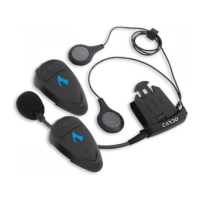
Identifies the physical components and controls of the FREECOM 1 headset.
Provides instructions for turning the headset on and off using button combinations.
Lists methods to operate the unit, including headset buttons and the SmartSet app.
Explains LED indicators for different operational modes and battery states.
Instructions for adjusting volume up, down, and muting the microphone.
Step-by-step guide to pairing devices using headset buttons for channel 1, 2, and GPS.
Introduces customization via SmartSet app and Cardo Community.
Guide to installing and using the SmartSet app for configuration.
Steps to configure FM radio presets using the Cardo Community software.
Instructions for making, answering, and rejecting phone calls.
How to start, stop, and navigate music playback and radio tuning.
Procedure for performing a soft reset if the unit becomes unresponsive.
Instructions for performing a factory reset, which deletes all paired devices.
Information on where to find answers to frequently asked questions.
Provides website and email for further support and contact details.
Official FCC compliance statement and warnings about radio frequency interference.
Statements regarding compliance with Industry Canada and European CE regulations.
States Bluetooth compliance and outlines copyright and intellectual property.
Important safety warnings regarding product usage.
Details potential risks like hearing loss, RF signals, and medical device interference.
Explains the two-year limited product warranty terms, conditions, and coverage.
Lists conditions that void the warranty and procedures for obtaining service.
Legal release of liability for product use, covering injuries and damages.
Details user responsibilities, risk acknowledgments, and acceptance of terms.
 General
| Bluetooth Version | 4.1 |
|---|---|
| Battery Life | 13 hours |
| Water Resistance | IP67 |
| Weight | 40 grams |
| Standby Time | 1 week |
| Speakers | 40mm |
| Speaker Diameter | 40 mm |
| Microphone Type | Built-in |
| Range | 500 meters |
| Operating Temperature | -20˚C to 55˚C / -4˚ F to 131 ˚ F |
| Wireless Range | 10 meters |








 To Next Page