10 Chapter 2 Cephalometric Modality Overview
Positioning Panel
The positioning panel is a console on the head and chin rest that enables you to correctly
position and align a patient before you acquire an image.
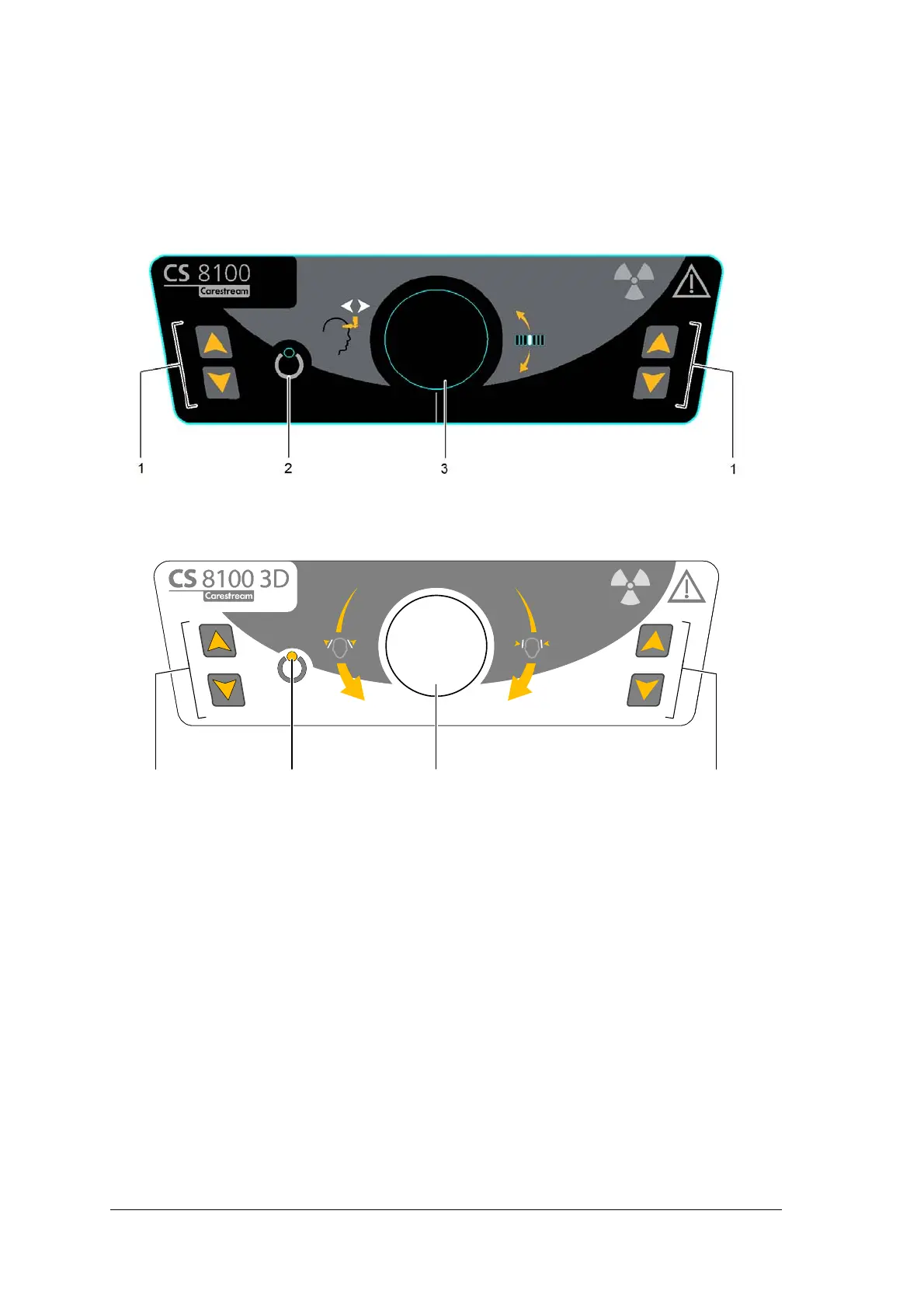
Figure 9 CS 8100 Family - Unit Positioning Panel
Figure 10 CS 8100 3D Family - Unit Positioning Panel
1 Height Adjustment buttons:
• Adjusts the height of the unit to the height of the patient.
• When the unit is not in use, places the rotative arm in a parallel position to the unit head,
leaving more free space around the unit.
To do so:
• press and hold both buttons until the Ready Indicator LED switches off.
• When you release both buttons, the Ready Indicator LED will flash before the
rotative arm turns to the parallel position.
2 Ready Indicator LED: Green indicates that the unit is ready for acquisition.
3 Frontal head rest adjustment knob (CS 8100 Family only): Positions the up or down
inclination of the patient
head by turning the knob.
Temple support adjustment knob (CS 8100 3D Family only): Opens and closes the
temple supports when you turn the knob.



 To Next Page