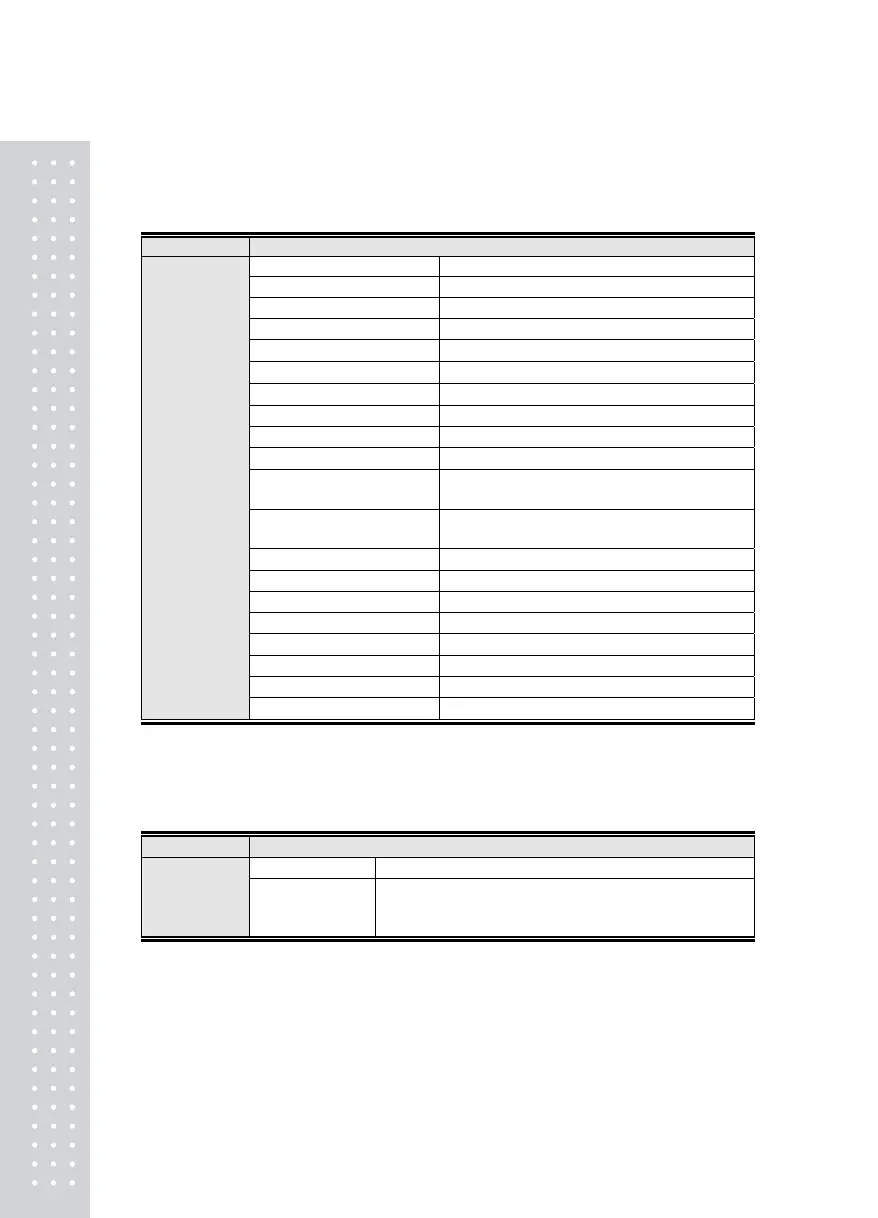
Menu-2120: F1 Key Use Type
Menu-2121: F2 Key Use Type
Menu-2122: F3 Key Use Type
Function Set Key Use Type
Display Part Meaning
ᆷ 1_Zero Key
F key used as the zero key
ᆷ 2_Total/Net Weight Key
F key used as the total./net weight key
ᆷ 3_Tare Key
F key used as the tare key
ᆷ 4_Subtotal Key
F key used as the subtotal key
ᆷ 5_Total Key
F key used as the total key
ᆷ 6_Clearing Key
F key used as the clearing key
ᆷ 7_Prin t Key
F key used as the print key
ᆷ 8_HoldKey
F key used as the hold key
ᆷ 9_Tare Cancelling Key
F key used as the tare cancelling key
ᆷ 10_Step1 Set Value
Entering Key
F key used as the step 1 setting key
ᆷ 11_ Step2 Set Value
Entering Key
F key used as the step 2 setting key
ᆷ 12_Step3 or 1 Fall Key
F key used as the step 3 setting key
ᆷ 13_ Step4 or 2 Fall Key
F key as the step 4 setting key
ᆷ 14_Upper Limit Input
F key used as the upper limit input key
ᆷ 15_Lower Limit Input
F key used as the lower limit input key
ᆷ 16_Start Key
F key used as the start key
ᆷ 17_Stop Key
F key used as the stop key
ᆷ 18_Print Form Key
F key used as the print form key
Set Range
(1 ~19)
ᆷ 19_Holdless Key
F key used as the holdless key
Note 1. The base setting of F1 key is the Print key.
Note 2. The base setting of F2 key is the Hold key
Note 3. The base setting of F3 key is the Tare Cancelling key.
Menu-2123
Function Set Near Zero(Print, Relay)
Display Part Meaning
Set Range
(0~99)
ᄋ x 1 Digit
Initial Value: 0x
1 Digit
Up to the set value * 1 Digit is allowed as the zero
5



 To Next Page