- 30 -
11. Function Mode
How to Go to Set Mode
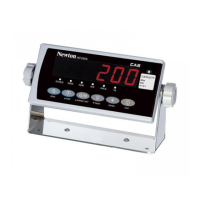
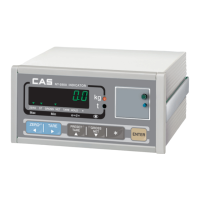
If you press the [ENTER] key during 2~3 seconds in normal mode,
you can go to Function Mode after displaying
"on" and " dEUI=Z " " SEt=t "
MODE KEY DESCRIPTION
Set
TARE Go to the Set Mode
Device
ZERO Go to the Device Mode
Normal
ENTER Go to the Normal Mode
SET Mode Menu
Menu Description
F01
WEIGHT BACKUP
F02
SET HOLD TYPE
F03
LIVE-STOCK DELAY TIME
F04
BACK-LIGHT
F05
SELECT the Operation of BUZZER when ERROR is occurred
F06
SELECT LIMIT MODE
F07
SELECT the METHOD of ACCUMULATION
F08 KEY LOCK
F09
SELECT THE RANGE of PASSWORD TO BE APPLIED
F10 SELECT THE CHANGE OF PASSWORD
WEIGHT BACKUP
KEY FUNCTION DISPLAY VAL. DESCRIPTION
S E T
Select 0 or 1
0
Not use weight backup
ENTER
Save &
Go to F02
F01
1
Use weight backup (Zero, Tare….)
UNIT Save & Exit
Save & go to Normal Mode



 To Next Page