51
7. Weighing Mode
7-1. How to enter Weighing Mode
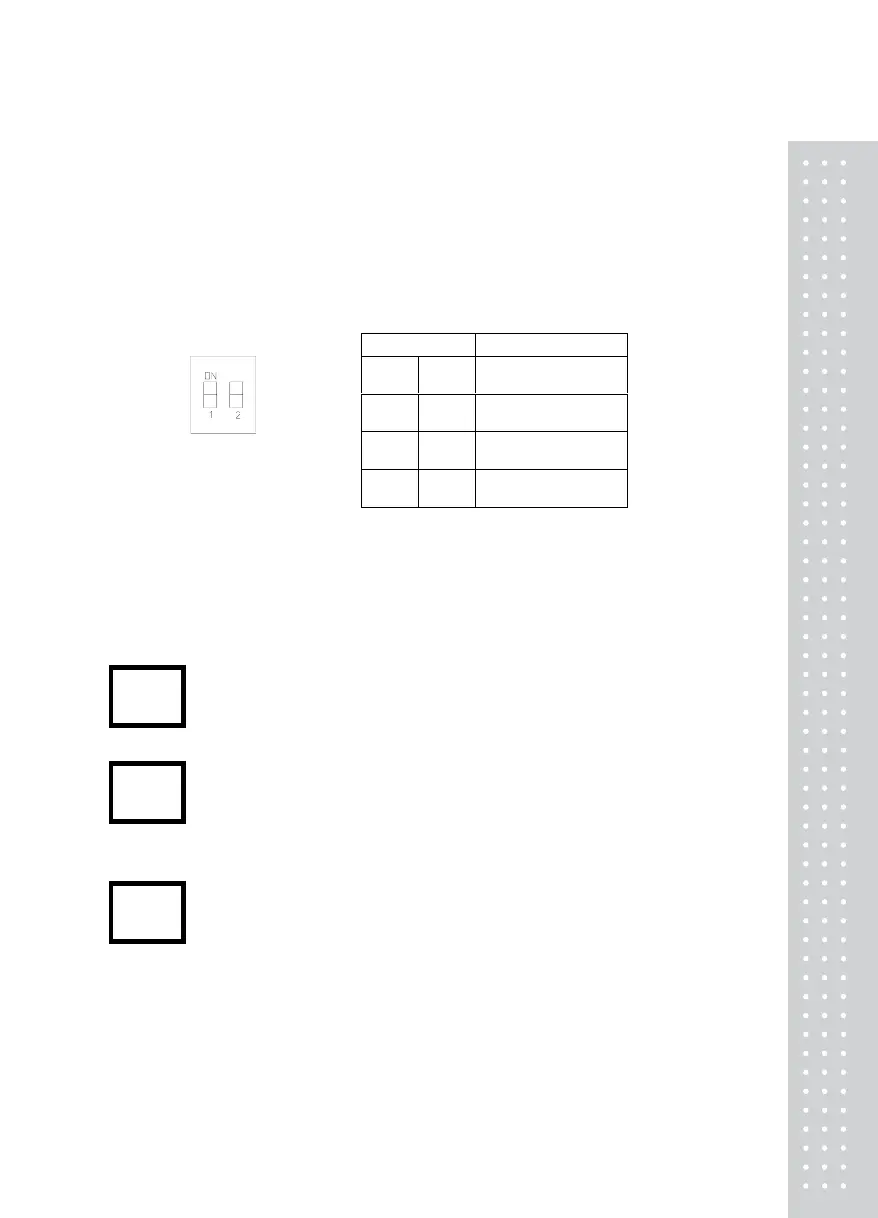
If you open the front cover of indicator and turn on all of the DIP S/W, the Weighing Mode is
started.
□ DIP SWITCH : MODE TABLE
7-2. Available Keys in Weighing Mode
▣Execute the zero Calibration. it makes the present value 0kg.
(It works within the range of the digital zero regulation value.)
▣ Use the tare in weighing.
▣Memorize the tare weight and the display NET value which the weight is
subtracted from the total weight.
▣Use it to input the tare weight manually.
▣ “t 0000” is displayed if pressing the PRESET TARE key.
The tare weight is inputted if pressing the ENTER key after inputting the
value of it with arrow keys.
DIP S/W Indicator Mode
0 0
Test Mode
(Test)
0 1
Calibration Mode
(CAL)
1 0
Set Mode
(SET)
1 1
Weighing Mode
(WEIGHING)
ZERO
TARE
PRESET
TARE


 To Next Page