VIEWING IMAGES ON A COMPUTER
119
4.
On the “Hard Disk” window that opens,
double-click the “System Folder” to open it.
5.
On the “System Folder” window, double-click
the “Extensions” folder to open it.
6.
Double-click the “CASIO” folder and then the
“ENGLISH” folder. Next, double-click the CD-
ROM’s “USB Driver” folder to open it.
7.
On the “USB Driver” window that opens, drag
the “CASIO - USB StorageDriver” file and
“CASIO-USB StorageClassShim” file to the
“Extensions” folder window you opened
above.
8.
This completes USB driver installation. After
checking the “Extensions” folder to make
sure that it contains the “CASIO-USB
StorageDriver” and “CASIO-USB
StorageClassShim” files, restart your
Macintosh.
9.
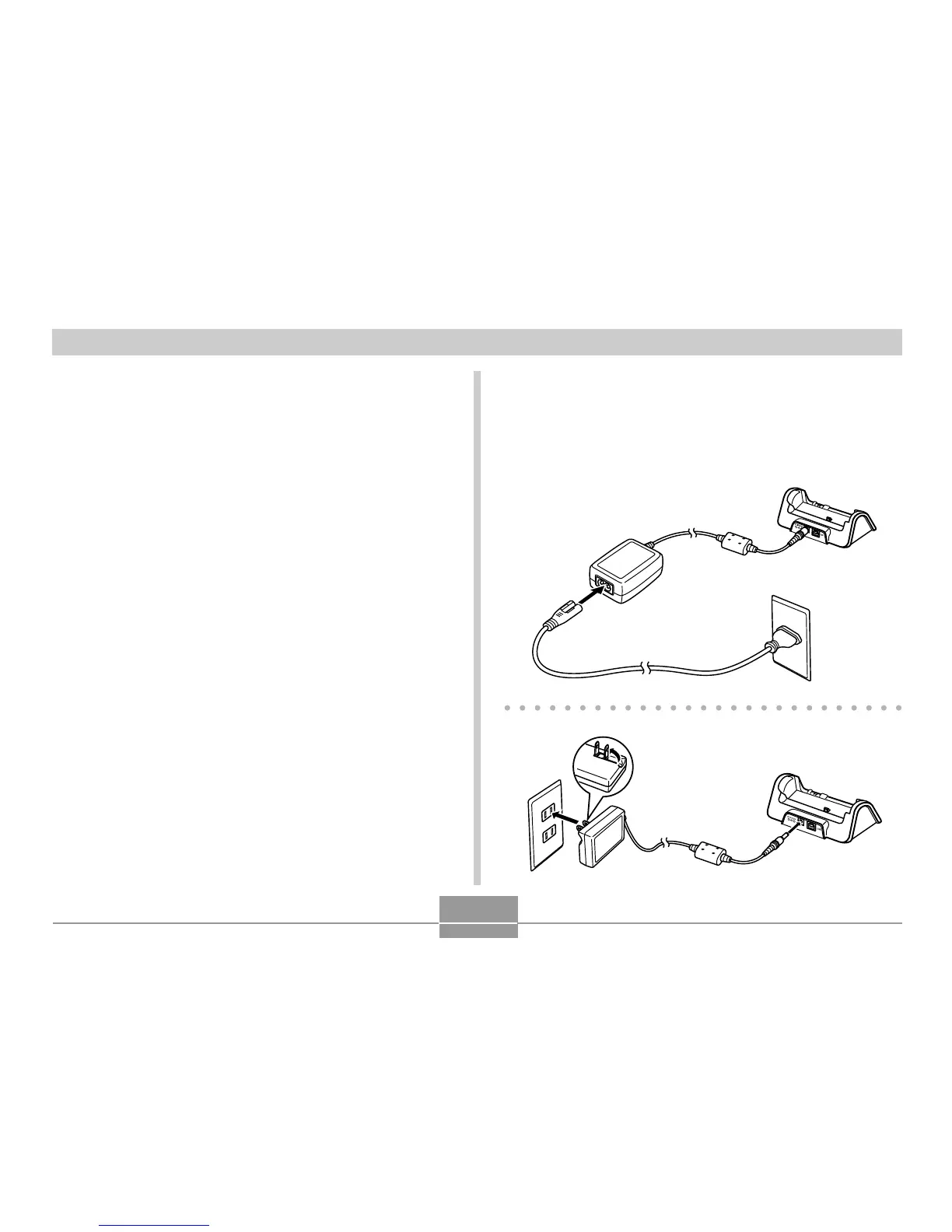
Connect the bundled AC adaptor to the [DC IN
5.3V] connector of the USB cradle, and then
plug it in to a household power outlet.
• Note that the shape of the AC adaptor depends on
the area where you purchased the camera.



 To Next Page
 Loading...