154
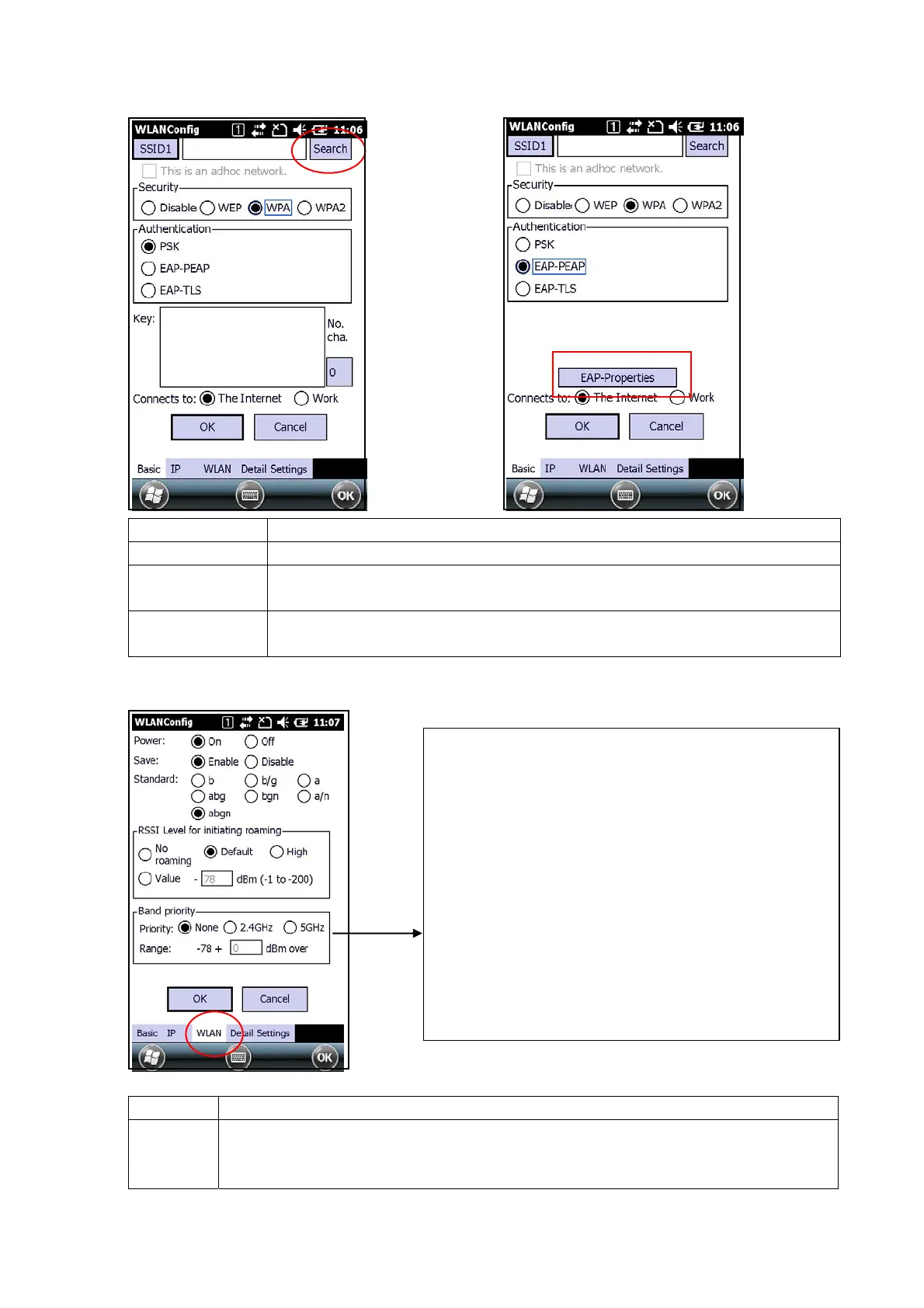
[Basic]Tab (Security:WPA) [Basic]Tab (Authentication:EAP-PEAP)
Item
Eexplanation
SSID1 Press the Search button to display a list of SSIDs.
Security
PSK, EAP-PEAP, or EAP-TLS authentication can be set for WPA.
The key is set for PSK.
Authentication
If EAP-PEAP or EAP-TLS is selected, press the EAP Properties button to
make settings such as user name, and domain validate server.
[WLAN]Tab
Tab Eexplanation
WLAN Make basic settings for WLAN configuration. These settings cover wireless power
supply, power save mode, WLAN standard, the roaming threshold level, and priority
frequency band.
[Band Priority]
- None
Do not specify the priority frequency band.
- 2.4GHz
Prioritize connection to 2.4 GHz. The valid range for
the threshold is specified as a relative value (dBm)
from the roaming start threshold.
- 5GHz
Prioritize connection to 2.4 GHz. The valid range for
the threshold is specified as a relative value (dBm)
from the roaming start threshold.


 To Next Page
 Loading...











